Blog · Mixing from start to finish · Part 16 of 20
Dynamic EQ and multiband compression: fixing problems that come and go
How to tame resonances and harshness that only appear on some notes with dynamic EQ, how to use multiband compression on instruments and groups, and how to choose between them.
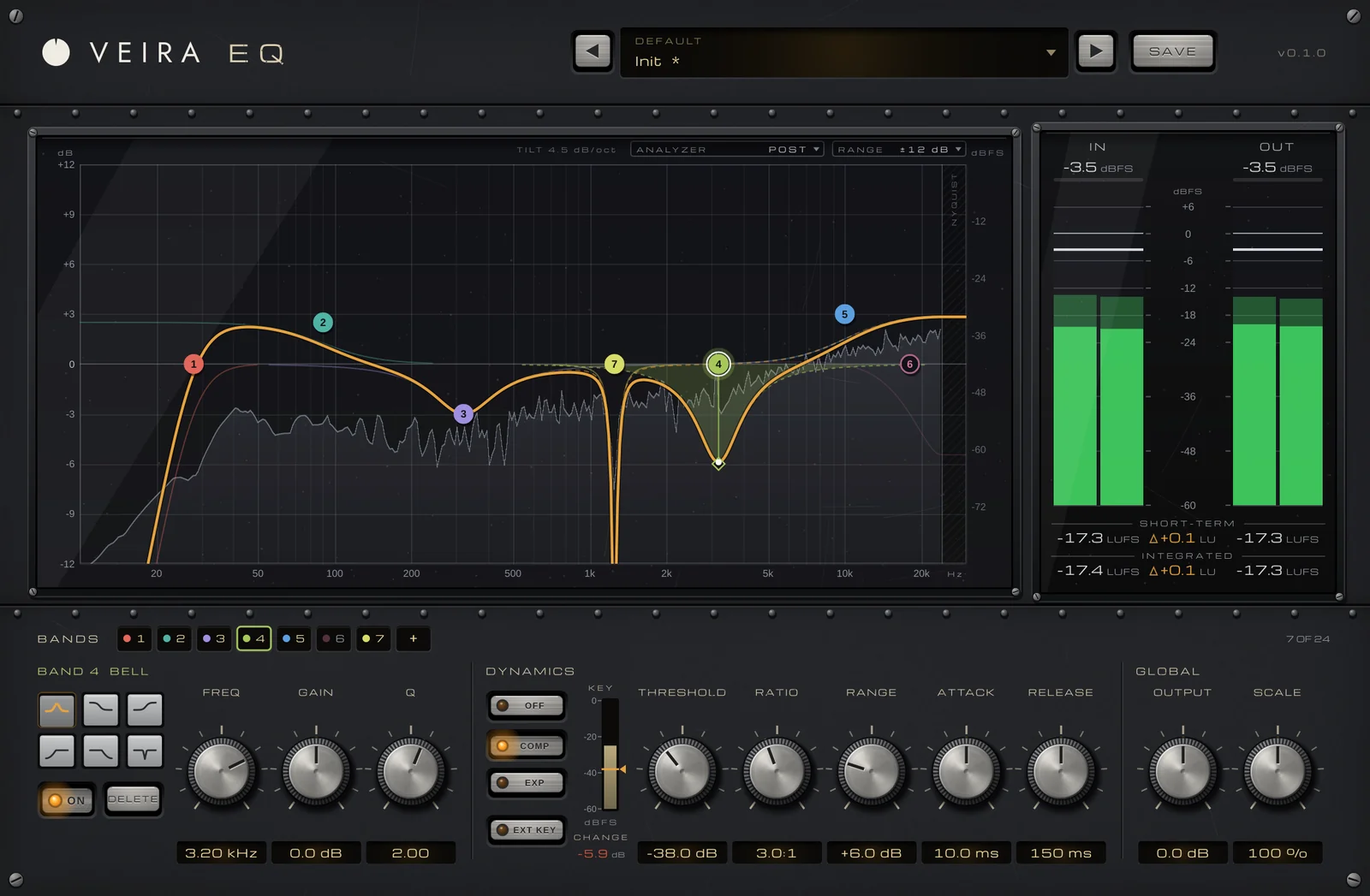
The space is built, and the mix now sounds like one performance in one place. Next comes a quieter kind of fix. Some problems aren’t there all the time: a boomy note on the bass, a harsh edge only when the singer pushes, an acoustic guitar that woofs on certain chords. A static cut fixes those moments but thins the part everywhere else. Dynamic EQ and multiband compression act only when the problem shows up.
Static, dynamic or multiband?
Before you reach for a tool, listen to how the problem behaves.
- Always there, at one frequency: a static cut, as in part 4.
- Only on some notes or in loud moments, in a narrow range: a dynamic EQ band.
- A whole region of the spectrum that swings in level, such as the low end of a bass or the top of a cymbal-heavy group: multiband compression.
- The level of the whole part swinging: ordinary compression on the whole part, as in part 5.
The difference between the middle two matters. A dynamic EQ band works on a bell or shelf you place exactly, with its own width, and leaves everything around it alone. Multiband compression splits the sound at crossovers into bands that sit side by side and covers the whole spectrum, evening out each band on its own.
Dynamic EQ for resonances and harshness
In VEIRA EQ, any bell or shelf can be dynamic: it cuts a harsh resonance or lifts presence only when that frequency range gets loud. To find the problem, sweep a narrow boost slowly across the range while the part plays and listen for the note that jumps out, then turn the boost into a cut. The usual suspects are 200 to 400 Hz for boom and mud, 2 to 5 kHz for harshness and 5 to 8 kHz for sibilance. Then set the band from these starting points and adjust by ear:
- Q around 3 to 6 for a single resonance, wider (1 to 2) for general harshness.
- Threshold set so the band only moves on the offending notes and rests in between.
- Ratio 2:1 to 4:1, with a range of 3 to 6 dB, so the band can never cut too deep.
- Attack around 5 to 20 ms and release around 50 to 150 ms, so the cut follows the notes.
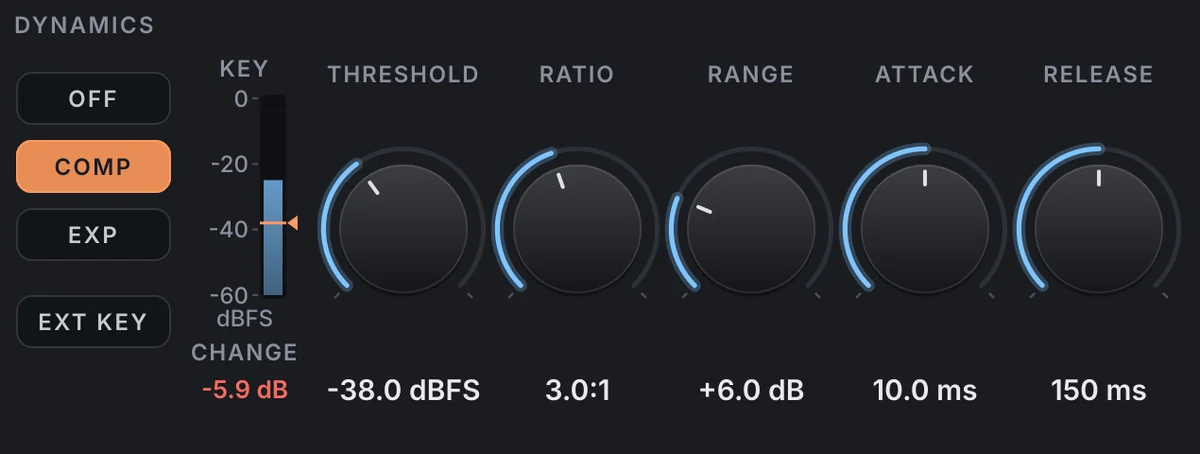
Only bell and shelf bands can be dynamic, and each one can compress or expand, with a threshold from −60 to 0 dBFS, a ratio up to 20:1, a range of up to 24 dB, attack from 0.1 to 200 ms and release from 5 to 2000 ms. On the graph, the shaded area is the band’s range, the dashed line its static setting, and the solid curve what it’s doing right now, so you can watch it dip only on the notes that ring.
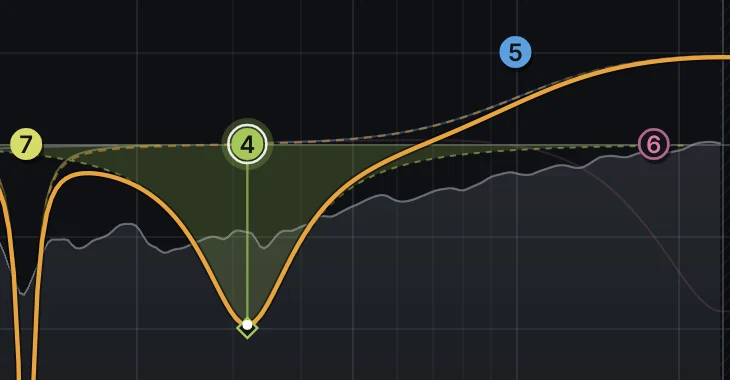
Dynamic bands also work the other way round. Set to expand, a presence band that lifts only when that range gets loud lets a vocal open up in the chorus without sounding brighter in the verse. And with EXT KEY a band listens to the sidechain instead: dip the bass’s low end only when the kick hits, building on part 8, or the guitars’ presence only while the vocal sings. The KEY meter shows the detector against the threshold, with the live change in dB.
Multiband compression on instruments and groups
VEIRA Multiband Compressor splits the track into six bands, with five crossovers you drag along the display from 30 Hz to 16 kHz. Each band has one AMOUNT knob, set against the band’s own long-term level rather than a threshold in dBFS, so a setting does the same on a quiet track as on a loud one, plus GAIN from −18 to +18 dB.
- Bass: even out the lowest band so every note carries the same weight, while the mids and the string noise stay natural.
- Acoustic guitar: steady the low mids, where the body boom swells on some chords.
- Drum overheads or a cymbal-heavy group: hold the top bands back when the crashes come in.
- Backing vocal or keys bus: calm a low-mid build-up that only appears when everyone plays at once.
MODE sets what each band does: DOWN turns its loud moments down (up to 8:1 at 100 %), UP brings its quiet moments up, and BOTH pulls the band towards its own level from both sides. STEREO lets a band work on its MID or its SIDE only, for example to hold the lows in the centre. As a starting point, set a modest AMOUNT on just the band that needs it, around 20 to 30 %, then adjust by ear, and use SOLO to hear what that band contains.
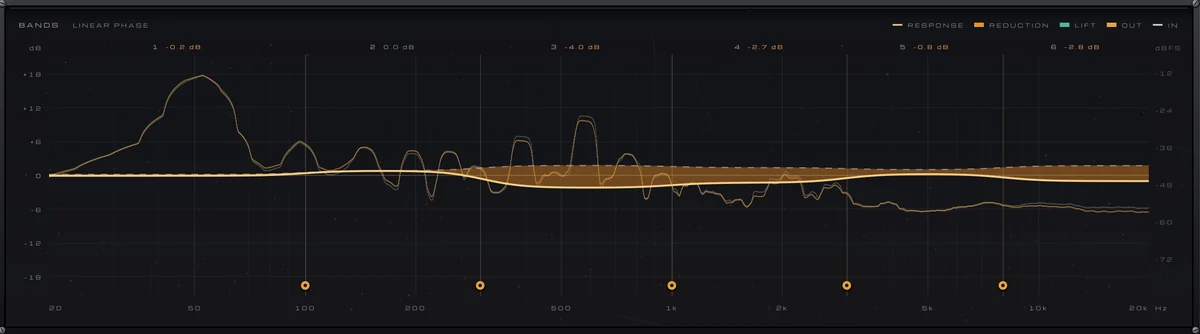
The BANDS display fills orange where a band is being turned down and teal where it’s lifted, with the live reduction over each band. AUTO MAKEUP gives each band back what its compression takes on average, so evening a band out doesn’t make it quieter. ATTACK and RELEASE are shared and scaled per band, slower in the lows and quicker in the highs. By default the crossovers add no latency; LINEAR PHASE is for mastering and adds 24 ms of latency at 48 kHz, which you don’t need on a track.
Common mistakes
- Too many bands working at once: the part loses its natural tone. Work only where you hear a problem.
- A range that’s too deep: a resonance cut by 12 dB on every note is just a static cut that wobbles.
- Judging by level: a quieter version often sounds worse at first. Compare at matched loudness with the OUT − IN reading in LU on the meter bridge of either plugin.
- Using dynamic tools to fix what is really a balance or arrangement problem. If the part is simply too loud, move the fader.
Used this way, dynamic EQ and multiband compression are finishing tools: small, targeted moves that let a part keep its full tone most of the time and lose only the moments that hurt. In the next part we turn to the width of the mix, and how to keep it solid in mono.