VEIRA Multiband Compressor

A six-band compressor with one knob per band, that works the same at any level.

$149.99, a one-time purchase with free updates

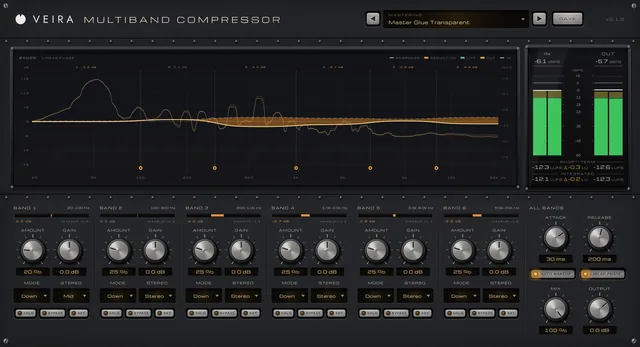
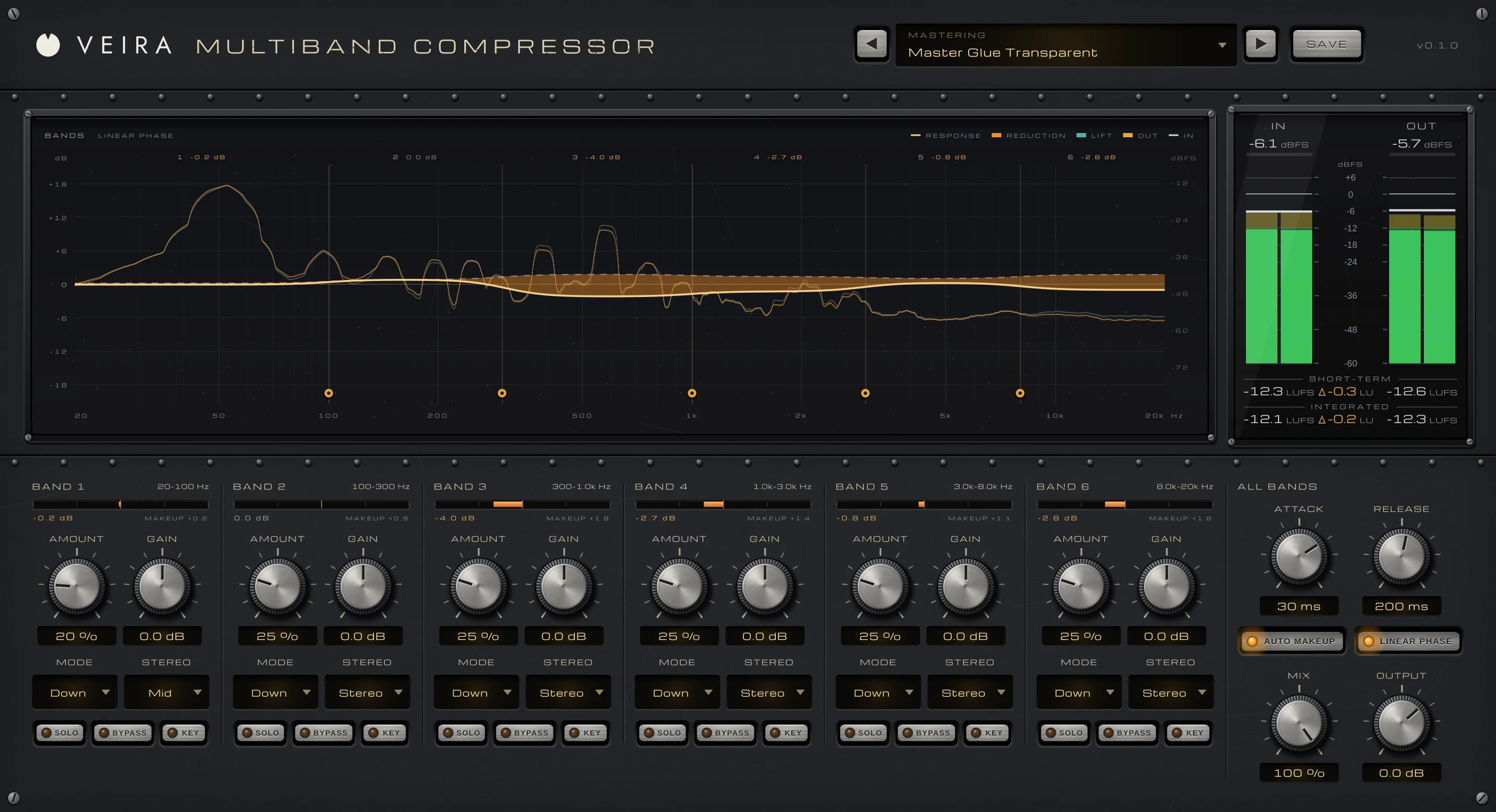
VEIRA Multiband Compressor with the Master Glue Transparent preset in LINEAR PHASE while a mix plays: the BANDS display with the spectrum in and out and the response of the six bands, orange where they are turned down; the IN and OUT meters with loudness; the six band strips with their meters, AMOUNT, GAIN, MODE and STEREO; and ALL BANDS with ATTACK at 30 ms, RELEASE at 200 ms, AUTO MAKEUP and LINEAR PHASE on.

VEIRA Multiband Compressor splits a track, a bus or a master into six bands and evens each one out on its own, so you can tame a boomy low end, a harsh upper mid or loud cymbals without touching the rest. Each band can turn its loud moments down, lift its quiet ones up, or both, on the whole stereo picture, the mid or the side, or duck under a sidechain.

What sets it apart is how little you need to set. Each band has one AMOUNT knob that works against the band’s own level, so a setting does the same on any track at any level, and AUTO MAKEUP keeps every band where it was. The BANDS display shows what each band is doing as it happens, and the crossovers add no latency for tracking, or switch to linear phase for mastering.

A tour of VEIRA Multiband Compressor

VEIRA Multiband Compressor with the Master Glue Transparent preset in LINEAR PHASE while a mix plays: the BANDS display with the spectrum in and out and the response of the six bands, orange where they are turned down; the IN and OUT meters with loudness; the six band strips with their meters, AMOUNT, GAIN, MODE and STEREO; and ALL BANDS with ATTACK at 30 ms, RELEASE at 200 ms, AUTO MAKEUP and LINEAR PHASE on.
  1. The whole of VEIRA Multiband Compressor

    VEIRA Multiband Compressor splits your track into six bands and evens each one out with a single AMOUNT knob, set against the band’s own level, so a setting does the same on a quiet track as on a loud one. Each band can turn its loud moments down, lift its quiet ones up, or both, work on the mid or the side only, or duck under a sidechain. AUTO MAKEUP keeps every band at its level, and the BANDS display shows what every band is doing as it happens.

  2. Six bands at a glance

    The spectrum in and out, the response of every band as it moves, and the crossover handles to drag.

  3. Down in orange, up in teal

    Orange shows where a band is being turned down right now; the dashed line is where it sits on average.

  4. In and out

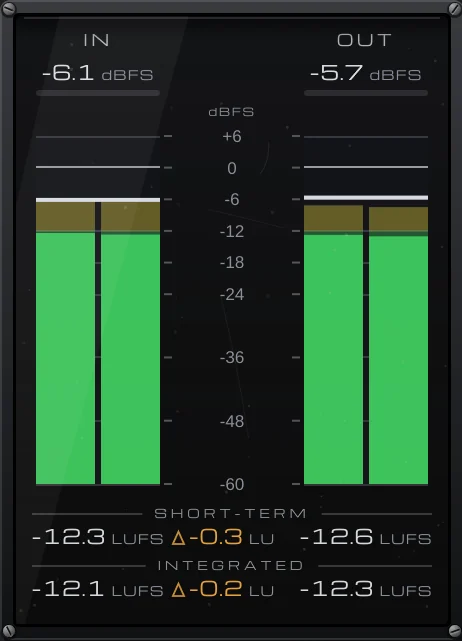
    Peak and RMS for the input and the output, with short-term and integrated loudness.

  5. A strip per band

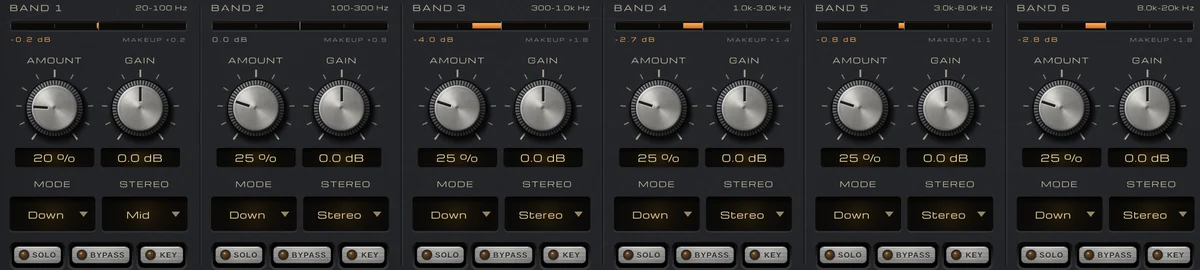
    Each band’s meter, AMOUNT, GAIN, MODE and STEREO, with SOLO, BYPASS and KEY.

  6. All bands

    ATTACK and RELEASE for every band, AUTO MAKEUP, LINEAR PHASE, MIX and OUTPUT.

What VEIRA Multiband Compressor does for you

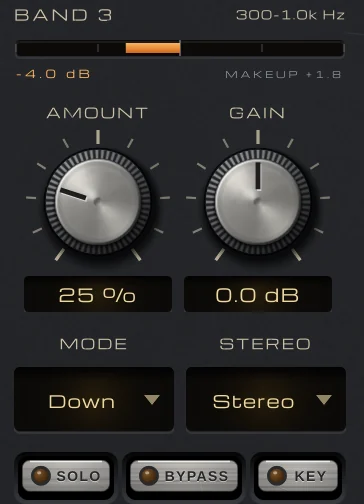
BAND 3, 300 Hz to 1.0 kHz: its meter at −4.0 dB with MAKEUP +1.8, AMOUNT at 25 %, GAIN at 0.0 dB, MODE Down, STEREO Stereo, and SOLO, BYPASS and KEY.

One knob per band

Each of the six bands has AMOUNT, which sets how much it’s evened out, and GAIN (−18 to +18 dB). AMOUNT works against the band’s own long-term level, not a threshold in dBFS, so the same setting does the same on a quiet track as on a loud one, and a preset works on your material without retuning. The meter over each band shows what its dynamics do right now.

  • AMOUNT 0–100 %
  • The same at any level
  • GAIN ±18 dB
The MODE and STEREO menus of bands 1 to 3 (band 1 on Down and Mid, bands 2 and 3 on Down and Stereo) and their SOLO, BYPASS and KEY buttons.

Down, up, or both

MODE sets what each band does: DOWN turns its loud moments down (up to 8:1 at 100 %), UP brings its quiet moments up (upward compression, for room and detail, never the noise far under the music), and BOTH pulls the band towards its own level from both sides. STEREO works on the whole band, its MID or its SIDE only: hold the lows in the centre, lift the air at the sides.

  • DOWN, UP or BOTH
  • STEREO, MID or SIDE
  • Per band
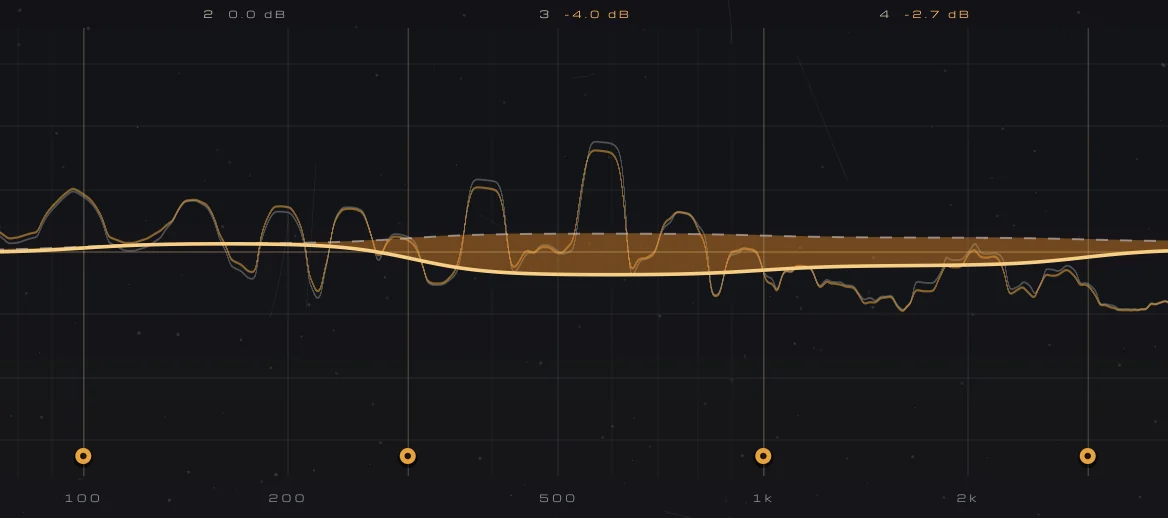
A close-up of the response: orange where the bands from 300 Hz up are turned down a few dB, the dashed line where they sit on average, and the crossover handles.

See every band at work

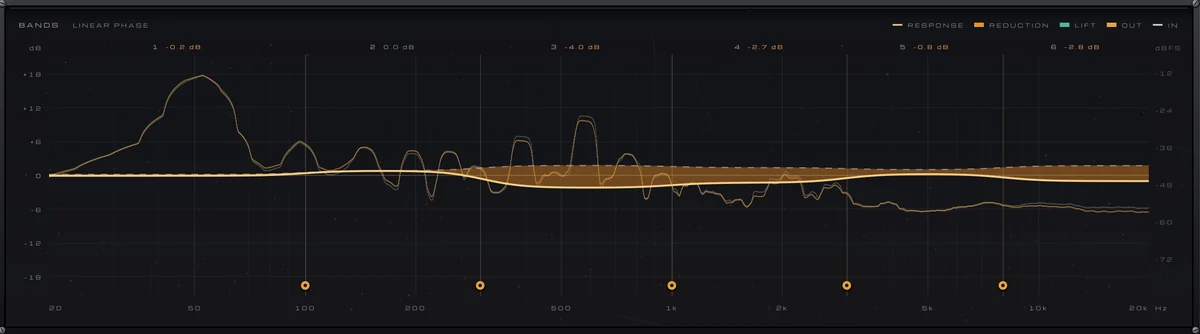
The BANDS display shows the spectrum going in and coming out, and the whole compressor’s response as it moves: orange where a band is being turned down, teal where it’s lifted, with a dashed line where each band sits on average. Over each band, what its dynamics are doing in dB. Hover for the frequency and both responses.

  • Live response
  • Orange down, teal up
  • Hover read-out
The BANDS display from 20 Hz to 20 kHz: the spectrum in and out as lines, the response of the six bands with the reduction filled in orange, each band’s live reduction above it, and the five crossover handles.

Crossovers where you need them

Drag the five crossover handles along the bottom of the display, from 30 Hz to 16 kHz, and double-click one to put it back. By default the crossovers add no latency and add up flat, within 0.01 dB. LINEAR PHASE switches to linear-phase bands for mastering: no phase change at all, for 24 ms of latency reported to your DAW, and switching it never clicks.

  • Drag on the display
  • Zero latency, or LINEAR PHASE
  • Flat within 0.01 dB
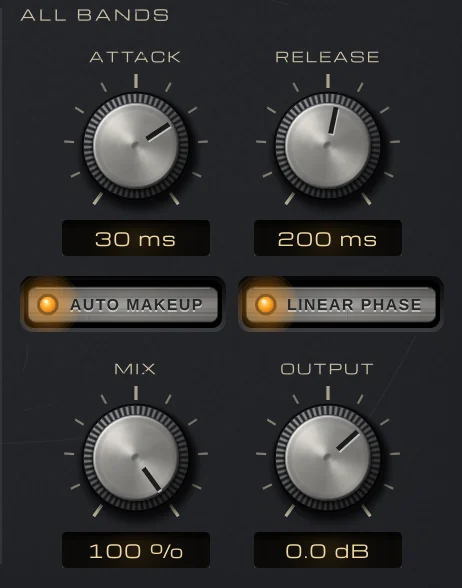
ALL BANDS: ATTACK at 30 ms, RELEASE at 200 ms, AUTO MAKEUP and LINEAR PHASE lit, MIX at 100 % and OUTPUT at 0.0 dB.

Each band keeps its level

AUTO MAKEUP gives each band back what its compression takes on average, corrected by the energy the band really loses, so evening a band out doesn’t make it quieter: on dynamic notes the band’s average stays within 0.25 dB. A loud passage the compression is holding isn’t turned back up. ATTACK and RELEASE are shared and scaled per band (slower in the lows, quicker in the highs), and MIX blends in the dry bands for parallel compression that stays in phase.

  • Within 0.25 dB
  • Parallel compression in phase
  • Shared ATTACK and RELEASE
The six band strips, each with its meter, AMOUNT, GAIN, MODE and STEREO, and SOLO, BYPASS and KEY.

Duck one band from another track

Press KEY on a band and it listens to the same band of the sidechain input instead: a bass’s lows dip under each kick, a pad pumps in the low mids, or a mix makes room for a voice-over in the voice range only. A keyed band ducks under its own level and is never lifted between the hits.

  • KEY per band
  • Mono or stereo sidechain
  • Ducks of 3.7–7.8 dB in the presets
The meter bridge: IN at −6.1 dBFS and OUT at −5.7 dBFS, peak and RMS, with short-term loudness of −12.3 and −12.6 LUFS and integrated loudness of −12.1 and −12.3 LUFS.

Levels and loudness, in and out

The meter bridge shows IN and OUT peak and RMS in dBFS, with short-term and integrated loudness and OUT − IN in LU, so you see what the compression does to the level. Click the loudness rows to start a new measurement.

  • Peak and RMS
  • Short-term and integrated LUFS
  • OUT − IN in LU
The preset browser showing Mastering: Master Glue Transparent, with previous, next and Save.

75 presets, each one measured

Thirteen folders, from Drums, Bass and Vocals to Mix Bus and Mastering (every Mastering preset in LINEAR PHASE), plus Sidechain and Creative FX (heavy upward compression, a multiband squash, mid/side tricks). Regular presets change the level against bypass by at most 0.28 dB, and the bands they don’t work on stay within 0.5 dB.

  • 13 folders
  • Save your own
  • Recalled with your session

Get VEIRA Multiband Compressor

Pay once and it’s yours, with every future update included.

VEIRA Multiband Compressor

A six-band compressor with one knob per band, that works the same at any level.

  • Yours to keep: pay once, no subscription
  • Every future update, free for life
  • VST3, AU, Standalone on up to 3 computers
  • Changed your mind? Cancel within 14 days (refunds)
USD

One-time payment, in your cart.

Welcome offer

Get 10% off your first order

Leave your email and we’ll send you a code for 10% off your first order, on any plugins. One code per person.

Specifications

Type
Six-band compressor: DOWN, UP (upward) or BOTH per band, against each band’s own level
Crossovers
Five, 30 Hz to 16 kHz, dragged on the display; zero latency (Linkwitz-Riley, flat within 0.01 dB) or LINEAR PHASE
Per band
AMOUNT 0 to 100 %; GAIN −18 to +18 dB; MODE (Down, Up, Both); STEREO (Stereo, Mid, Side); SOLO, BYPASS, KEY
All bands
ATTACK 0.1 to 100 ms and RELEASE 5 ms to 2 s (scaled per band); AUTO MAKEUP; LINEAR PHASE; MIX 0 to 100 %; OUTPUT −24 to +12 dB
Latency
None; with LINEAR PHASE 1152 samples at 44.1 and 48 kHz (24 ms at 48 kHz), reported to your DAW
Sidechain
Mono or stereo; a band with KEY listens to the same band of the sidechain
Metering
BANDS display: the spectrum in and out, the live response with reduction (orange) and lift (teal); a meter per band; IN and OUT peak and RMS; short-term and integrated LUFS
Presets
75 factory presets in 13 folders (including Sidechain and Creative FX), plus your own
Channels
Mono or stereo
Formats
VST3, AU, Standalone
macOS
macOS 11 or later, Apple silicon or Intel (universal). VST3, AU and Standalone.
Windows
Windows 10 or later, 64-bit. VST3 and Standalone.
Pro Tools
Pro Tools (AAX) versions are built and tested, and arrive once they’re signed for Pro Tools.
Latest version
0.2.0, released October 31, 2026 · What’s new

Read more on the blog: Multiband compression: controlling one part of the spectrum at a time · Dynamic EQ and multiband compression: fixing problems that come and go

Questions? 9 answers about VEIRA Multiband Compressor
Works well with

VEIRA Comp

A tube-coloured compressor you can read like an instrument.

$149.99

VEIRA Max

A loud, clean mastering limiter that shows every decibel it takes.

$149.99

VEIRA Sub Control

A compressor for the low end only, beside a bass enhancer that makes it carry on any speaker.

$49.99