VEIRA Gate

A drum and noise gate you set by eye, and it takes the bleed out of the hits.

$49.99, a one-time purchase with free updates

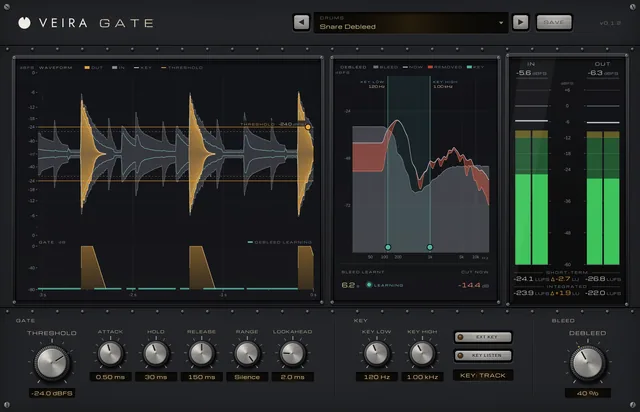
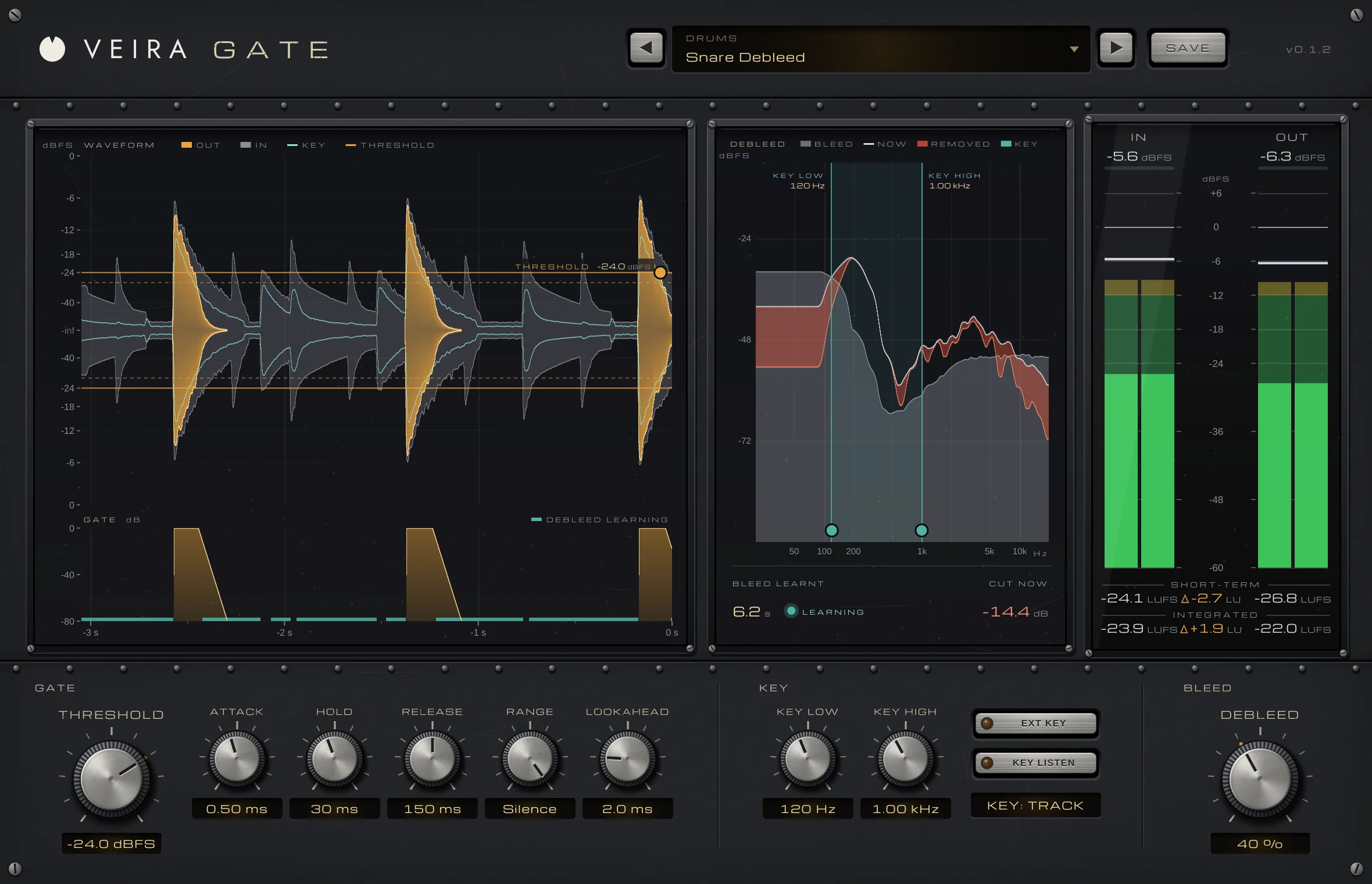
VEIRA Gate with the Snare Debleed preset on a snare microphone with bleed: the waveform with the THRESHOLD lines at −24.0 dBFS, the GATE lane, the DEBLEED panel with the learnt bleed and what it removes, the meter bridge and the controls.

VEIRA Gate is a drum and noise gate for close-miked drums, noisy guitars, voice-overs and anything with unwanted sound between the notes. You set it by eye: the waveform shows the track with the bleed between the hits, and you drag the threshold line between the two.

DEBLEED goes further than a gate can. It learns what the bleed sounds like while the gate is closed and takes it out of the hits too, so the hi-hat under the snare goes quieter as well. Lookahead lets the first transient through untouched, and key filters or an external key make it listen to the right drum.

A tour of VEIRA Gate

VEIRA Gate with the Snare Debleed preset on a snare microphone with bleed: the waveform with the THRESHOLD lines at −24.0 dBFS, the GATE lane, the DEBLEED panel with the learnt bleed and what it removes, the meter bridge and the controls.
  1. The whole of VEIRA Gate

    VEIRA Gate is a drum and noise gate you set by eye: the waveform shows the track and the bleed between the hits, and you drag the THRESHOLD line between the two. DEBLEED goes further than a gate can. It learns what the bleed sounds like while the gate is closed, and takes it out of the hits too.

  2. Set it by eye

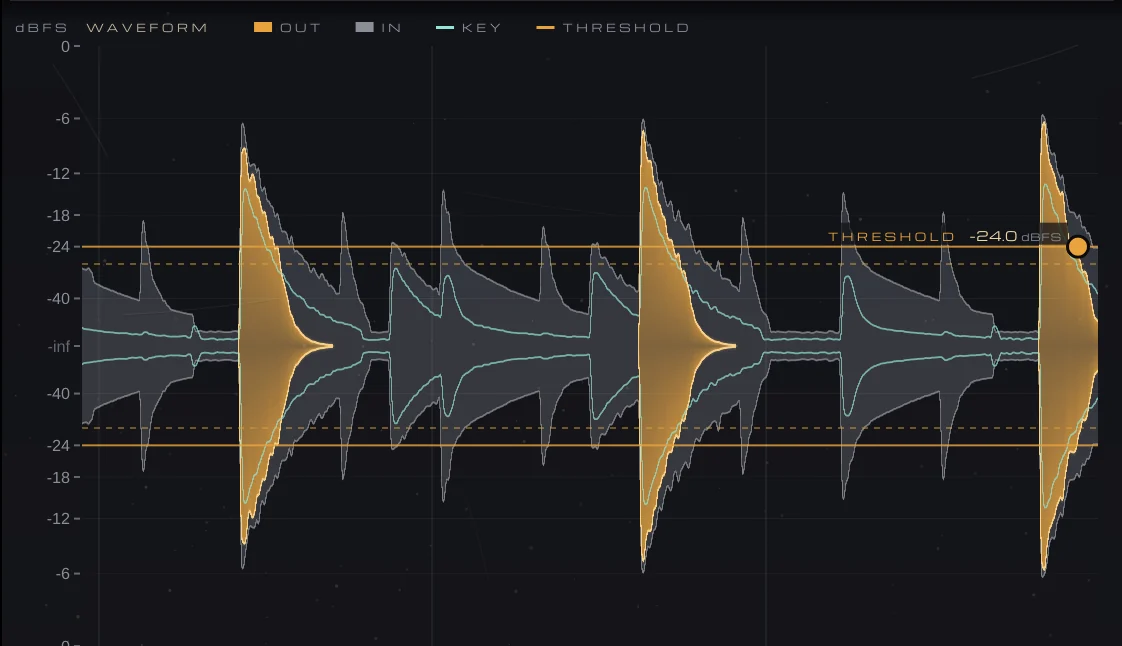
    The output in amber, the input in grey behind it, and the key in teal. Drag the THRESHOLD line between the bleed and the hits.

  3. The gate, open and closed

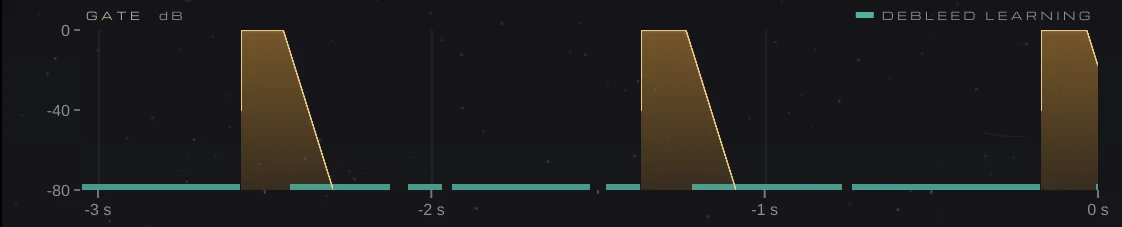
    How far open the gate is, on the waveform’s clock, with a teal strip where DEBLEED was learning.

  4. What DEBLEED takes out

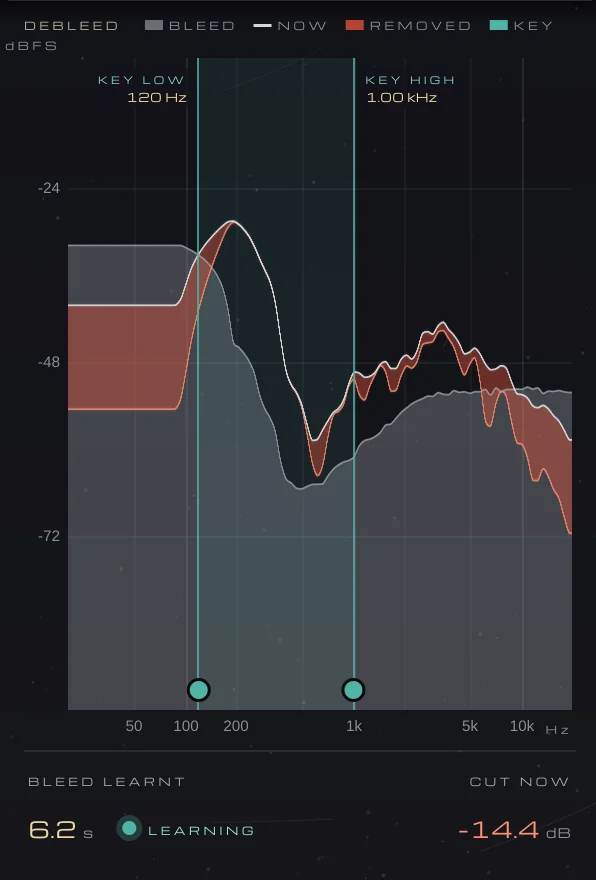
    The learnt bleed in grey, the input now, and in red what DEBLEED removes. The teal band is the key filter; drag its edges.

  5. In and out

    Peak and RMS for the input and the output, with short-term and integrated loudness.

  6. Gate, key and bleed

    Six knobs shape the gate, the KEY section sets what it listens to, and DEBLEED sets how much bleed comes out of the hits.

What VEIRA Gate does for you

The waveform: snare hits in amber over the grey input with its bleed, the teal key level, and the THRESHOLD lines at −24.0 dBFS.

Set the threshold where you can see it

The waveform shows the last 3 seconds or so: the output in amber, the input in grey behind it, so whatever the gate removed shows in grey. The teal line is the level the gate listens to; drag either amber THRESHOLD line between the bleed and the hits, or double-click it to return to −40 dBFS. Hover anywhere for the time, levels, gate and DEBLEED at that moment.

  • Draggable THRESHOLD
  • Hover read-out
  • About 3 s of history
The GATE lane: the gate opening on each hit and closing over the release, with teal strips where DEBLEED was learning.

Watch every open and close

Under the waveform, the GATE lane draws how far open the gate is on the same clock, from closed at the bottom to open at the top. A teal strip marks the moments DEBLEED was learning the bleed.

  • Gate gain over time
  • DEBLEED learning marked
The DEBLEED panel: the learnt bleed in grey, the input now, what DEBLEED removes in red, the key band from 120 Hz to 1.00 kHz, 6.2 s of bleed learnt and −14.4 dB cut now.

Bleed out of the hits, not just between them

A gate can only silence the gaps; the hi-hat under the snare hit comes through with it. DEBLEED learns the bleed’s spectrum while the gate is closed, then turns down the frequencies the bleed dominates and leaves the ones the drum dominates almost untouched. On a snare microphone with bleed 14 dB under the snare, 50 % cuts the bleed under the hits by about 9 dB and costs the snare about 2 dB.

  • Learns while the gate is closed
  • Up to 36 dB per frequency
  • Ghost notes aren’t learnt
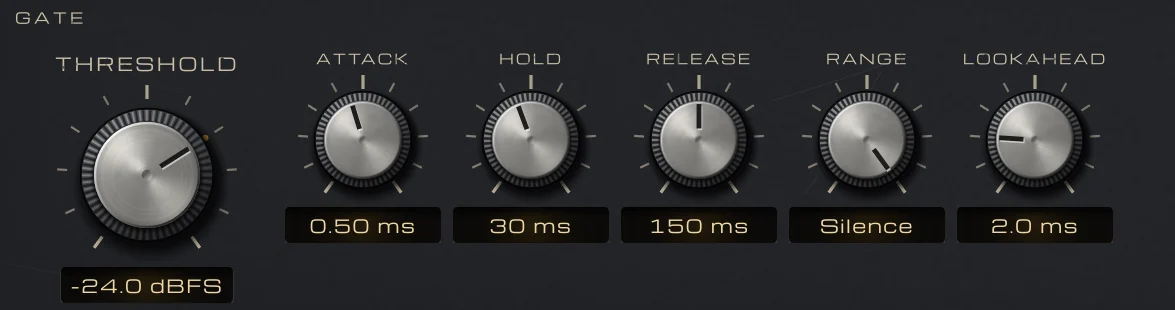
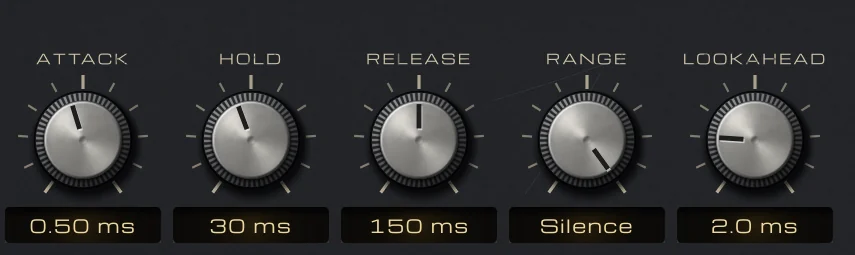
The GATE controls: THRESHOLD at −24.0 dBFS, ATTACK, HOLD, RELEASE, RANGE at Silence and LOOKAHEAD.

Opens cleanly, never chatters

The gate starts to close 4 dB under THRESHOLD, so a note hovering at the threshold doesn’t chatter. HOLD keeps it fully open after the hit, RELEASE closes it across the whole RANGE, and RANGE sets how far it closes: 10–20 dB keeps a little of the room, and at 80 dB (Silence) it closes to exact zeros.

  • 4 dB hysteresis
  • Exact silence at full RANGE
  • Hold 0 to 500 ms
ATTACK at 0.50 ms, HOLD at 30 ms, RELEASE at 150 ms, RANGE at Silence and LOOKAHEAD at 2.0 ms.

The first transient comes through untouched

LOOKAHEAD opens the gate up to 10 ms before the hit arrives, and ATTACK runs from 0.02 to 50 ms, so the crack of a snare or the click of a kick is never cut off. LOOKAHEAD works inside the plugin’s constant latency, so changing it never moves your track.

  • Lookahead 0 to 10 ms
  • Attack from 0.02 ms
  • Constant latency
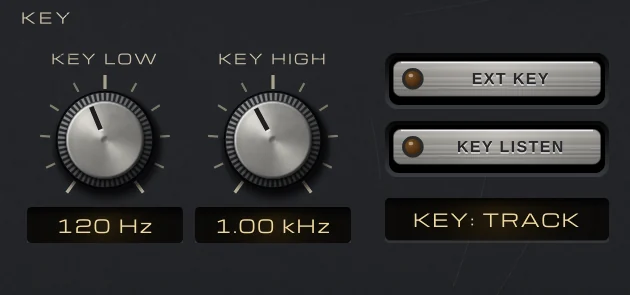
The KEY section: KEY LOW at 120 Hz, KEY HIGH at 1.00 kHz, EXT KEY, KEY LISTEN and the status KEY: TRACK.

Listen to the right drum

KEY LOW and KEY HIGH are 24 dB/oct filters on what the gate listens to, never on the audio, so a snare gate can ignore the kick and the hi-hat, and a kick gate the snare and the cymbals. Drag their edges on the DEBLEED panel, and press KEY LISTEN to hear the key while you tune them.

  • 24 dB/oct key filters
  • Draggable edges
  • KEY LISTEN
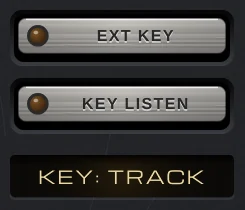
The EXT KEY and KEY LISTEN keys above the status box reading KEY: TRACK.

Key it from another track

Press EXT KEY and the gate listens to the sidechain instead of the track: route a kick, a trigger or a hi-hat to it in your DAW. With nothing routed there it falls back to the track, and the status box tells you which key it is using.

  • Mono or stereo sidechain
  • KEY: TRACK / SIDECHAIN
  • Falls back to the track
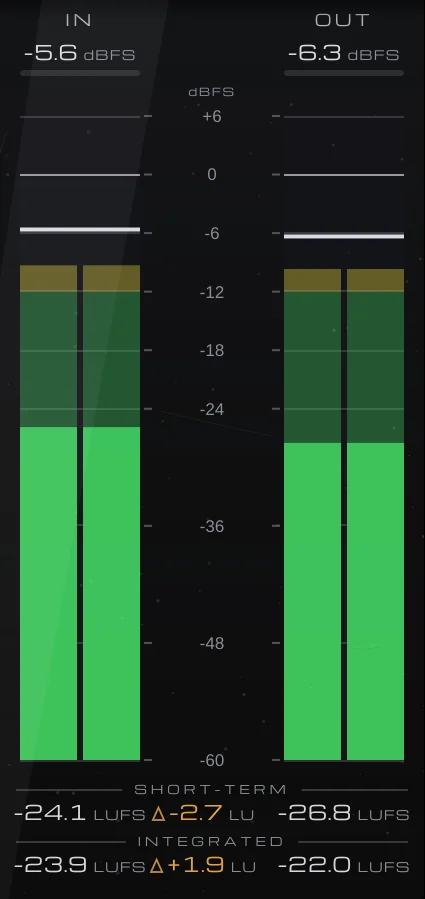
The meter bridge: IN and OUT peak and RMS, with short-term and integrated loudness and the difference in LU.

Levels and loudness, in and out

The meter bridge shows IN and OUT peak and RMS in dBFS, with short-term and integrated loudness and OUT − IN in LU, so you see what the gate did to the level. Click the loudness rows to start a new measurement.

  • Peak and RMS
  • Short-term and integrated LUFS
  • OUT − IN in LU
The preset browser with previous, next and Save, showing Snare Debleed in the Drums folder.

74 presets, each one measured

Fourteen folders: drums with and without DEBLEED, instruments, vocals, mix bus and mastering, plus Speech, Sidechain (kick- and snare-keyed pads and 16th-note trance gates) and Creative FX (gated plates and rooms, stutter and swell). Every one was tested to open on every hit or note, never on bleed or noise alone, and never chatter. THRESHOLD is the one to adjust to your track’s level.

  • 14 folders
  • Save your own
  • Recalled with your session

Get VEIRA Gate

Pay once and it’s yours, with every future update included.

VEIRA Gate

A drum and noise gate you set by eye, and it takes the bleed out of the hits.

  • Yours to keep: pay once, no subscription
  • Every future update, free for life
  • VST3, AU, Standalone on up to 3 computers
  • Changed your mind? Cancel within 14 days (refunds)
USD

One-time payment, in your cart.

Welcome offer

Get 10% off your first order

Leave your email and we’ll send you a code for 10% off your first order, on any plugins. One code per person.

Specifications

Type
Drum and noise gate with lookahead, a filtered or external key, and spectral bleed removal (DEBLEED)
Threshold
−80 to 0 dBFS; it starts to close 4 dB under it
Attack
0.02 to 50 ms
Hold
0 to 500 ms
Release
5 to 2000 ms
Range
0 to 80 dB; at 80 dB (Silence) it closes to exact zeros
Lookahead
0 to 10 ms, inside the constant latency
Key
24 dB/oct high-pass (off to 2 kHz) and low-pass (100 Hz to open) on the key only; EXT KEY (sidechain); KEY LISTEN
Debleed
0 to 100 %; up to 36 dB of cut per frequency, learnt from the last ~3 s of bleed
Latency
512 samples at 44.1 and 48 kHz (1024 at 88.2 and 96 kHz, 2048 at 176.4 and 192 kHz), constant and reported to your DAW
Metering
Waveform with key level; GATE lane; DEBLEED spectrum; IN and OUT peak and RMS; short-term and integrated LUFS
Presets
74 factory presets in 14 folders (including Speech, Sidechain and Creative FX), plus your own
Channels
Mono or stereo, with a mono or stereo sidechain
Formats
VST3, AU, Standalone
macOS
macOS 11 or later, Apple silicon or Intel (universal). VST3, AU and Standalone.
Windows
Windows 10 or later, 64-bit. VST3 and Standalone.
Pro Tools
Pro Tools (AAX) versions are built and tested, and arrive once they’re signed for Pro Tools.
Latest version
0.2.2, released October 31, 2026 · What’s new

Read more on the blog: Gating drums: cleaner toms and kick without choking the hits · Cleaning up tracks before mixing: noise, hum, clicks and drum bleed · Mixing kick and snare: gating, punchy compression and EQ

Questions? 9 answers about VEIRA Gate
Works well with

VEIRA Comp

A tube-coloured compressor you can read like an instrument.

$149.99

VEIRA DeEss

A de-esser that shows you every “s”.

$149.99

VEIRA EQ

A dynamic equaliser with up to 24 bands and an analyzer you can read.

$149.99