VEIRA Metering Suite

A complete meter that tells you if your mix is ready for where it’s going.

$39.99, a one-time purchase with free updates

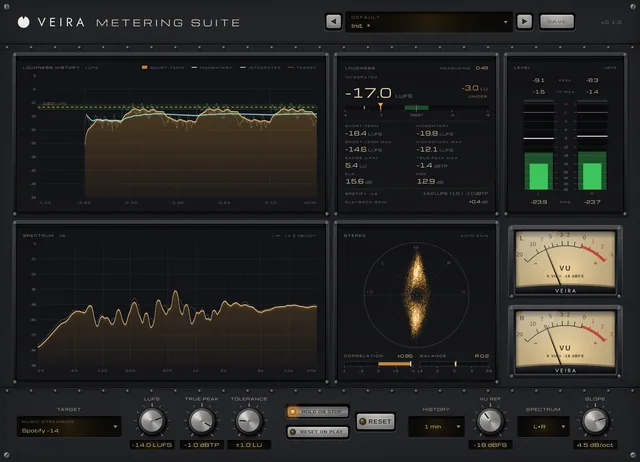
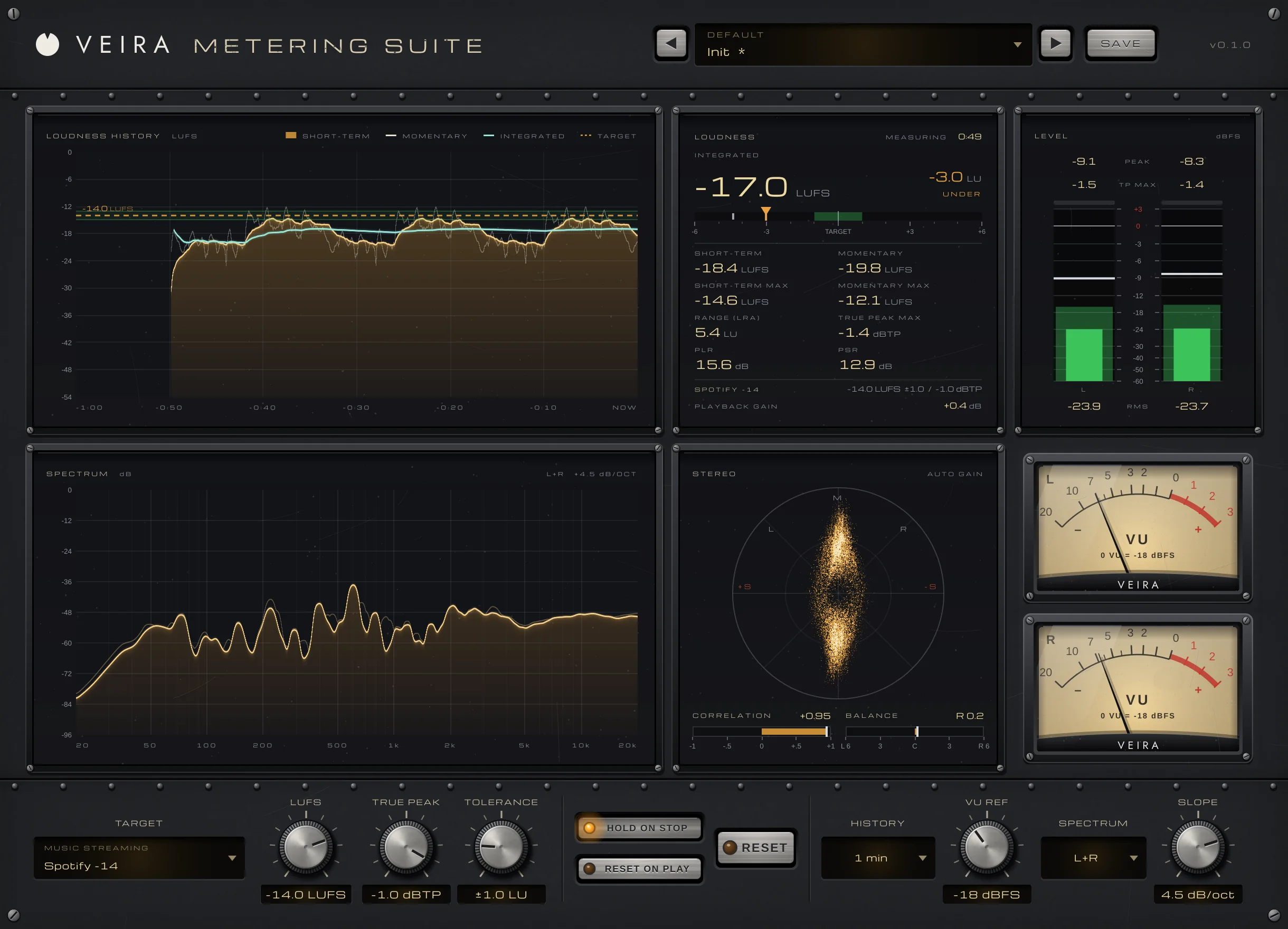
VEIRA Metering Suite on a song with the Init preset (history changed to 1 minute) and the Spotify −14 target: the loudness history, the loudness panel at −17.0 LUFS integrated and 3.0 LU under, the level meters, the spectrum, the stereo vectorscope, two VU meters and the controls.

VEIRA Metering Suite tells you whether your mix or master is ready for where it’s going: Spotify or Apple Music, broadcast, a podcast, a film or a game, or your own number. Pick the destination and it shows how far you are from its loudness target, whether you’re on it, over or under, and whether the true peaks pass.

Everything you need to check a mix is in one window: loudness and its history, true peak, PLR and PSR, level and VU meters, a spectrum analyser and a vectorscope with correlation. It measures without touching the sound, so you can leave it on the master bus from the first mix to the final bounce.

A tour of VEIRA Metering Suite

VEIRA Metering Suite on a song with the Init preset (history changed to 1 minute) and the Spotify −14 target: the loudness history, the loudness panel at −17.0 LUFS integrated and 3.0 LU under, the level meters, the spectrum, the stereo vectorscope, two VU meters and the controls.
  1. The whole of VEIRA Metering Suite

    VEIRA Metering Suite measures your mix against the destination you choose: a streaming service, a broadcast standard, a podcast or game spec, or your own number. The integrated loudness shows how far you are from that target and whether you’re on it, next to true peak, PLR, PSR, loudness range and its history, level and VU meters, a spectrum analyser and a vectorscope, all in one window. It changes nothing in the sound: the output is the input, bit for bit.

  2. The loudness over time

    Short-term, momentary and integrated loudness against the target and its tolerance, over up to 60 minutes.

  3. Where you stand

    The integrated loudness and its distance from the target, every other loudness figure, and what the destination will do with your master.

  4. Peak, true peak and RMS

    Left and right peak and RMS bars, with a warning light over each when the true peak passes the limit.

  5. The spectrum

    20 Hz to 20 kHz at 1/6-octave resolution, in L+R, L / R or M / S, tilted by SLOPE.

  6. Choose the destination

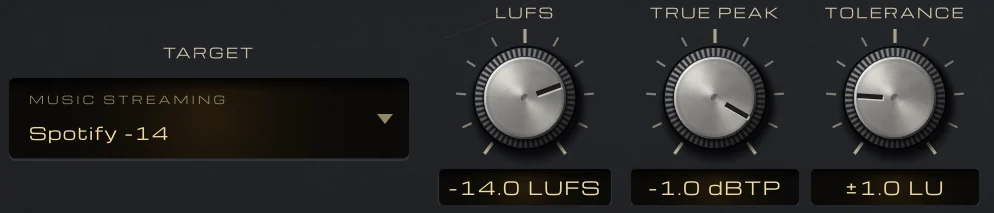
    TARGET sets the loudness, true-peak limit and tolerance in one go; the knobs make your own.

What VEIRA Metering Suite does for you

The target controls: TARGET set to Spotify −14, with LUFS at −14.0, TRUE PEAK at −1.0 dBTP and TOLERANCE at ±1.0 LU.

Measure against where it’s going

TARGET is a menu of 19 standards grouped by destination, from Spotify and Apple Music to EBU R 128, ATSC A/85, Netflix, podcasts and games. Choosing one sets its loudness, true-peak limit and tolerance; turn LUFS, TRUE PEAK or TOLERANCE yourself and the target becomes Custom.

  • 19 standards, or Custom
  • LUFS −40 to −5
  • Tolerance 0 to 5 LU
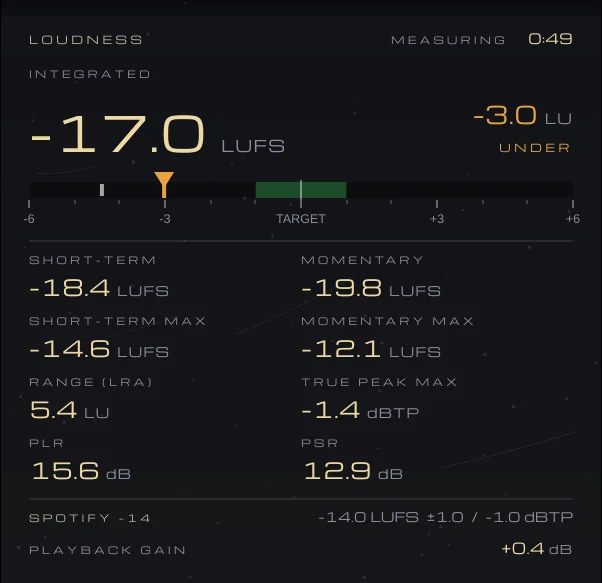
The LOUDNESS panel: −17.0 LUFS integrated, 3.0 LU UNDER on the target scale, the short-term, momentary, range, true-peak, PLR and PSR readings, and a PLAYBACK GAIN of +0.4 dB for Spotify −14.

On target, over or under

The integrated loudness shows how far you are from the target in LU and whether that’s ON TARGET, OVER or UNDER, beside short-term, momentary, range, true-peak max, PLR and PSR. For a streaming service the panel shows the PLAYBACK GAIN it would apply to your master; for a delivery spec, whether it PASSES or why not.

  • Distance in LU
  • Playback gain
  • Pass or fail
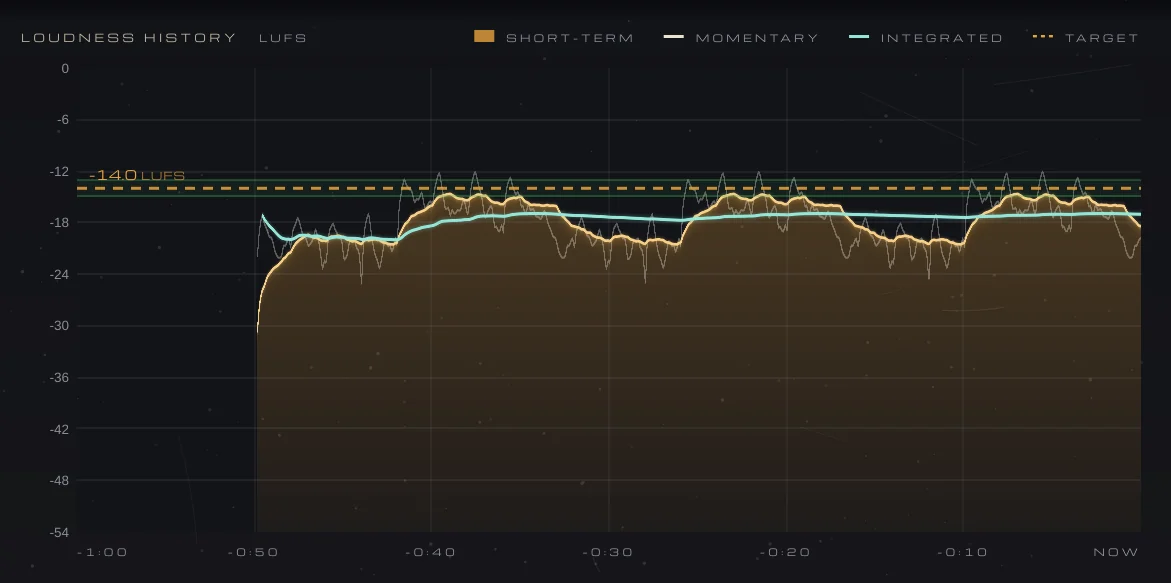
The LOUDNESS HISTORY over the last minute: the short-term loudness as a filled amber curve, the momentary as a light line and the integrated in teal, under the dashed −14 LUFS target and its tolerance band.

Watch the loudness move

LOUDNESS HISTORY draws the short-term loudness as a filled curve, red where it rises above the target’s tolerance, with the momentary as a light line and the integrated in teal as it settles. HISTORY shows the last 30 s up to 60 minutes; hover for the values at any moment.

  • 30 s to 60 min
  • Hover read-out
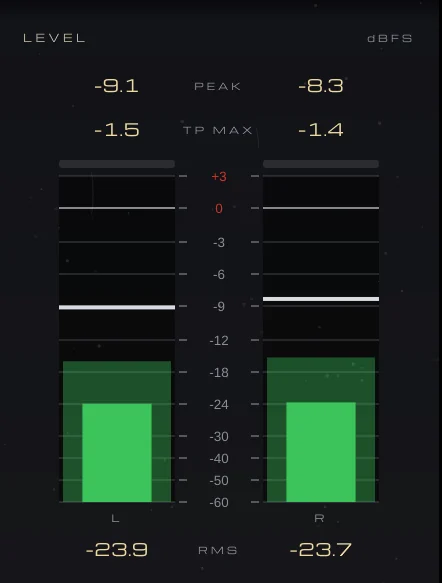
The LEVEL meters: left and right peak and RMS bars on a dBFS scale, with peak, TP MAX and RMS read-outs.

Peaks you can trust

LEVEL shows left and right peak and 300 ms RMS on a scale expanded towards the top, with a 2 s peak hold you clear with a click. True peak is measured with 8x oversampling, as in VEIRA Max: TP MAX turns red, and a light over each meter comes on, when it passes the limit.

  • 8x oversampled true peak
  • 300 ms RMS
  • 2 s peak hold
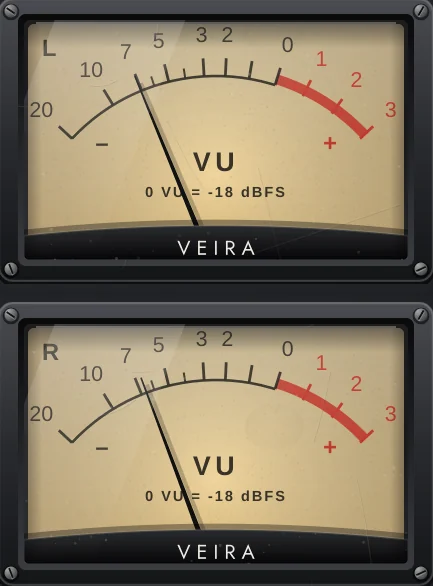
Two VU meters, left and right, with 0 VU at −18 dBFS.

A real VU, calibrated to your line-up

Two needle meters with true VU ballistics (IEC 60268-17: 300 ms to 99 %, 1–1.5 % overshoot), −20 to +3 VU. VU REF sets the level for 0 VU, −18 dBFS by default, the usual mixing line-up.

  • IEC 60268-17 ballistics
  • VU REF −24 to −8 dBFS
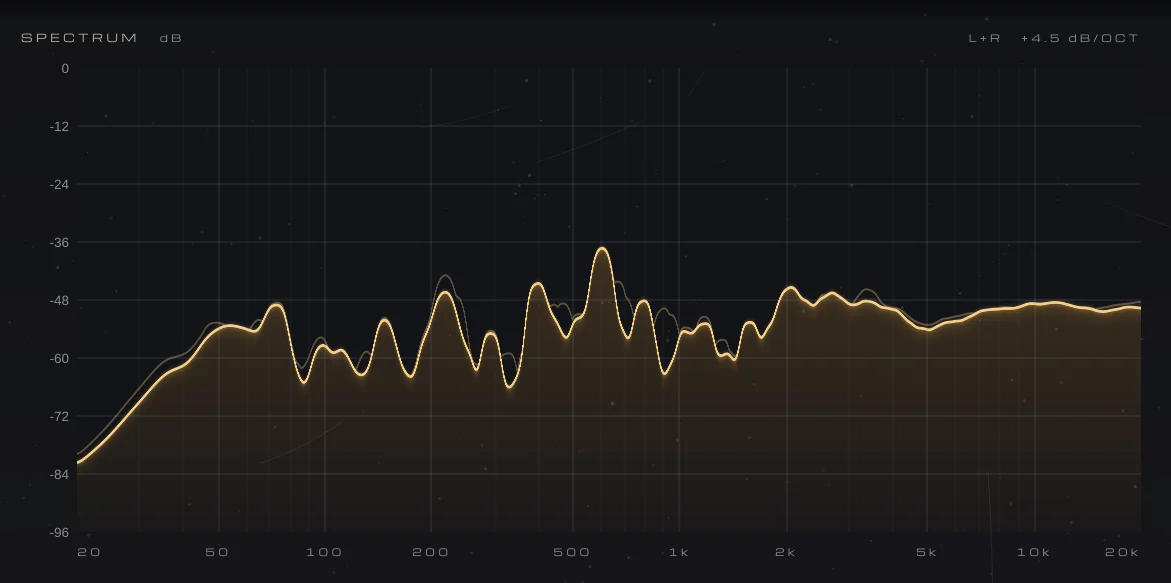
The SPECTRUM from 20 Hz to 20 kHz in L+R, tilted 4.5 dB per octave, as an amber curve with its peak line.

A spectrum you can read

20 Hz to 20 kHz from an 8192-point FFT, smoothed to 1/6 octave, with a falling peak line. SPECTRUM shows L+R, L / R or M / S, and SLOPE tilts it so a balanced mix reads about flat at 4.5 dB per octave. Hover for the frequency and level.

  • 8192-point FFT
  • L+R, L / R, M / S
  • SLOPE 0 to 6 dB/oct
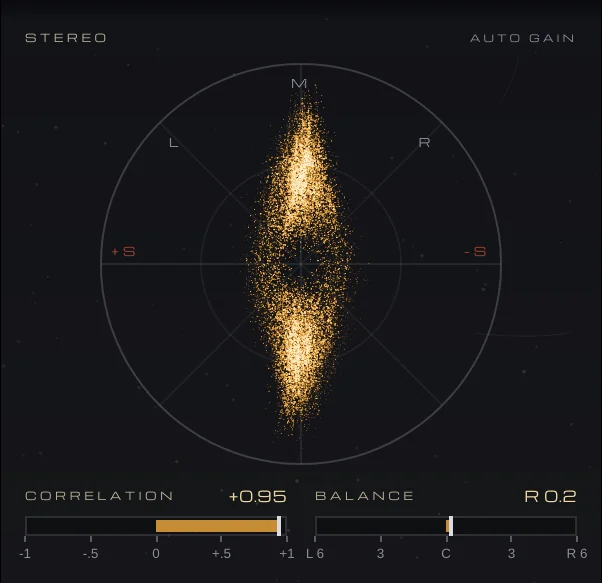
The STEREO panel: a vectorscope of the mix, CORRELATION at +0.95 and BALANCE at R 0.2.

Stereo and phase at a glance

A vectorscope draws every sample as a point, with automatic gain. CORRELATION reads +1 for mono, 0 for unrelated and below 0 for out of phase, and BALANCE shows the level difference in dB, both over 300 ms.

  • Vectorscope
  • Correlation
  • Balance in dB
The HOLD ON STOP key (on), RESET ON PLAY (off) and RESET.

Measure a programme the way you play it

With HOLD ON STOP, the programme measurement waits while your DAW is stopped, so playing a song in parts adds up to one measurement; RESET ON PLAY starts a new one each time playback starts, and RESET starts one by hand. Offline bounces always measure.

  • Hold on stop
  • Reset on play
  • Bit-exact, no latency
The preset browser with previous, next and Save.

26 presets, by destination

Folders for Music Streaming, Mastering, Broadcast, Film & Games and Podcast & Speech. Each sets the target and the view: history span, VU reference, spectrum mode and slope. The Mastering presets follow common practice, and say so.

  • 6 folders
  • Save your own
  • Recalled with your session

Get VEIRA Metering Suite

Pay once and it’s yours, with every future update included.

VEIRA Metering Suite

A complete meter that tells you if your mix is ready for where it’s going.

  • Yours to keep: pay once, no subscription
  • Every future update, free for life
  • VST3, AU, Standalone on up to 3 computers
  • Changed your mind? Cancel within 14 days (refunds)
USD

One-time payment, in your cart.

Welcome offer

Get 10% off your first order

Leave your email and we’ll send you a code for 10% off your first order, on any plugins. One code per person.

Specifications

Type
Loudness, level, spectrum and stereo meter (ITU-R BS.1770-4 / EBU R 128); the audio passes through bit for bit
Targets
19 standards in five groups (music streaming, broadcast, film & video, podcast & speech, games), or Custom
Target loudness
−40 to −5 LUFS
True-peak limit
−12 to 0 dBTP
Tolerance
0 to 5 LU
Loudness
Integrated, short-term (3 s) and momentary (400 ms) with maxima; range (EBU Tech 3342); true-peak max; PLR; PSR; history of 30 s to 60 min
Level
Peak and 300 ms RMS with a 2 s peak hold; true peak 8x oversampled
VU
IEC 60268-17 ballistics, −20 to +3 VU; VU REF −24 to −8 dBFS
Spectrum
20 Hz–20 kHz, 8192-point FFT, 1/6 octave; L+R, L / R or M / S; SLOPE 0 to 6 dB per octave
Stereo
Vectorscope, correlation and balance over 300 ms
Latency
None
Presets
26 factory presets in 6 folders, by destination, plus your own
Channels
Mono or stereo
Formats
VST3, AU, Standalone
macOS
macOS 11 or later, Apple silicon or Intel (universal). VST3, AU and Standalone.
Windows
Windows 10 or later, 64-bit. VST3 and Standalone.
Pro Tools
Pro Tools (AAX) versions are built and tested, and arrive once they’re signed for Pro Tools.
Latest version
0.2.0, released October 30, 2026 · What’s new

Read more on the blog: Is the mix ready? Loudness, true peak and phase for where it’s going · Preparing a mix session: organizing, gain staging and tuning checks · The static mix: building a balance with faders and panning

Questions? 9 answers about VEIRA Metering Suite
Works well with

VEIRA Max

A loud, clean mastering limiter that shows every decibel it takes.

$149.99

VEIRA Comp

A tube-coloured compressor you can read like an instrument.

$149.99

VEIRA Mastering Analyzer

A mastering analyzer built as a rack unit: eight live screens, with loudness against your destination’s target and your master’s tonal balance, dynamics and width against targets learned from your own reference songs.

$49.99