VEIRA Motion Filter

A filter that moves with your song: a new shape, cutoff and resonance on every step, gliding between them, locked to the song’s position and kept at your track’s loudness.

$29.99, a one-time purchase with free updates

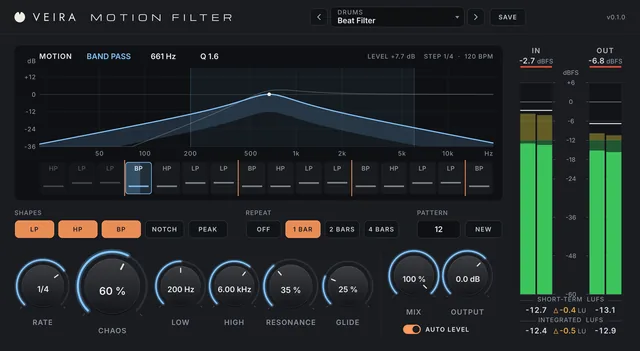
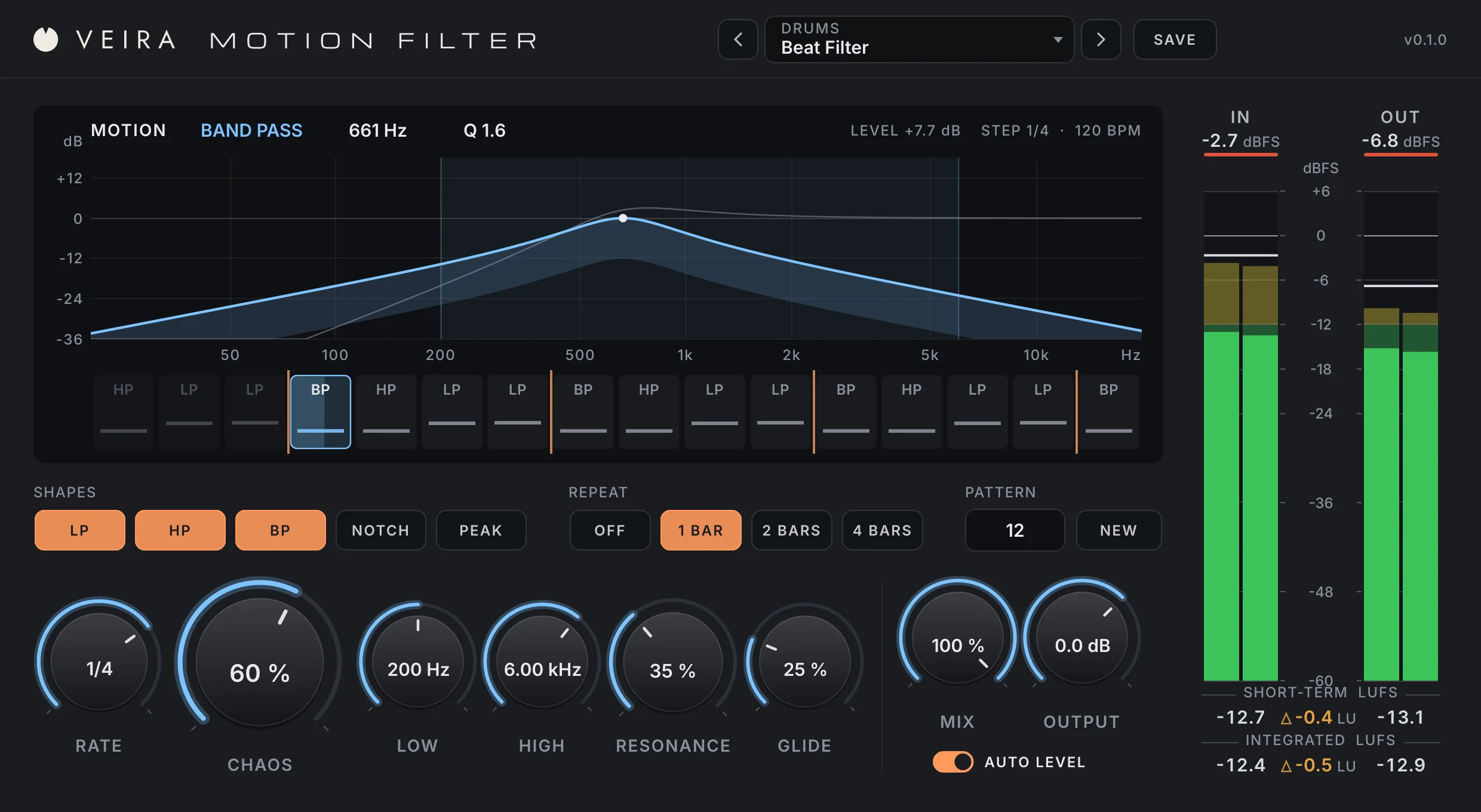
VEIRA Motion Filter with the Beat Filter preset while a mix plays at 120 BPM: the MOTION display with a band pass at 661 Hz in blue and the next step’s high pass in grey over the shaded range from 200 Hz to 6 kHz, LEVEL +7.7 dB and STEP 1/4 at 120 BPM above it, the STEPS lane with the playing step lit and orange marks every bar, the SHAPES buttons with LP, HP and BP lit, REPEAT 1 BAR, PATTERN 12 and NEW, the RATE, CHAOS, LOW, HIGH, RESONANCE and GLIDE knobs, MIX, OUTPUT and AUTO LEVEL, and the IN and OUT meters with loudness.

VEIRA Motion Filter is a filter that changes with the music. On every step of the song, every beat at 1/4, every sixteenth at 1/16, it picks a new shape (low pass, high pass, band pass, notch or peak), a new cutoff and a new resonance, and glides there. You don’t draw the movement: you choose how often it changes with RATE, which shapes it may use, the range it moves in with LOW and HIGH, how far it wanders with CHAOS, how sharp it is with RESONANCE and how smoothly it moves with GLIDE. It writes the pattern from a number, NEW gives you another, and REPEAT loops it every 1, 2 or 4 bars into a riff.

It is made to be part of the arrangement, not a random effect. Each step comes from the song’s position, so every playback and every bounce is the same and a pattern you like comes back exactly from its number. AUTO LEVEL gives every filter setting the gain that keeps your track as loud as it came in, without pumping, so the steps move the tone, not the level. There is no latency, and the MOTION display shows the filter now, the next step and the pattern around the step that’s playing. Put it on a drum loop for a beat filter, on a bass for a wobble, on chords for a rhythmic wah or on the mix bus for a build-up.

A tour of VEIRA Motion Filter

VEIRA Motion Filter with the Beat Filter preset while a mix plays at 120 BPM: the MOTION display with a band pass at 661 Hz in blue and the next step’s high pass in grey over the shaded range from 200 Hz to 6 kHz, LEVEL +7.7 dB and STEP 1/4 at 120 BPM above it, the STEPS lane with the playing step lit and orange marks every bar, the SHAPES buttons with LP, HP and BP lit, REPEAT 1 BAR, PATTERN 12 and NEW, the RATE, CHAOS, LOW, HIGH, RESONANCE and GLIDE knobs, MIX, OUTPUT and AUTO LEVEL, and the IN and OUT meters with loudness.
  1. The whole of VEIRA Motion Filter

    VEIRA Motion Filter is a filter that changes with the music. On every step of the song, every beat at 1/4, it picks a new shape (low pass, high pass, band pass, notch or peak), a new cutoff and a new resonance, and glides there. RATE sets how long a step lasts, CHAOS how far the steps wander inside the LOW to HIGH range, RESONANCE how sharp the filter is and GLIDE how smoothly it moves. The pattern comes from a number, so NEW gives you another and the one you like comes back exactly; REPEAT loops it every 1, 2 or 4 bars, and because each step is worked out from the song’s position, every playback and every bounce is the same. AUTO LEVEL keeps the sound as loud as it came in, so the steps move the tone, not the level, and the MOTION display shows the filter now, the next step and the pattern around it.

  2. The motion

    The filter now and on the next step over the LOW to HIGH range, with the pattern’s steps underneath.

  3. Shapes and patterns

    Light the shapes the steps choose from, loop the pattern with REPEAT, and press NEW for another.

  4. The steps

    RATE for how often it changes, CHAOS for how far it wanders, LOW and HIGH for where.

  5. Resonance and glide

    How sharp the filter is at its cutoff, and how smoothly it moves from step to step.

  6. Mix and level

    Blend with the dry signal, set the level, and AUTO LEVEL keeps the input’s loudness.

  7. In and out

    Peak and RMS for the input and the output, with short-term and integrated loudness.

What VEIRA Motion Filter does for you

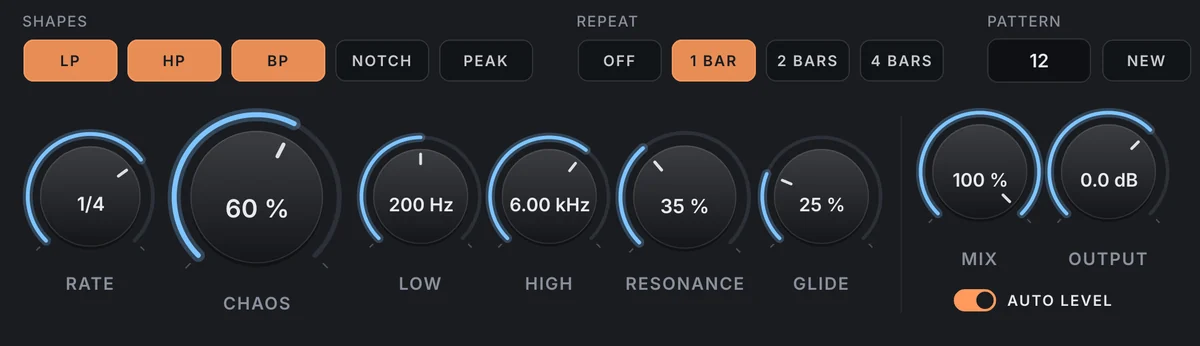
The controls: the SHAPES buttons with LP, HP and BP lit, REPEAT 1 BAR, PATTERN 12 and NEW; RATE at 1/4, CHAOS at 60 %, LOW at 200 Hz, HIGH at 6.00 kHz, RESONANCE at 35 % and GLIDE at 25 %; MIX at 100 %, OUTPUT at 0.0 dB and AUTO LEVEL on.

A new filter on every step

The song is cut into steps, from a 32nd note to a whole bar, triplets and dotted values included, and every step gets a filter of its own: one of the SHAPES you light, a cutoff inside the range set by LOW and HIGH, and a resonance up to what RESONANCE allows. CHAOS sets how far the cutoffs spread from the middle of the range, from 0 % (only the shape changes) to 100 % (anywhere from LOW to HIGH), and GLIDE how the filter gets from one step to the next.

  • 11 note values
  • Five shapes
  • Your range, your spread
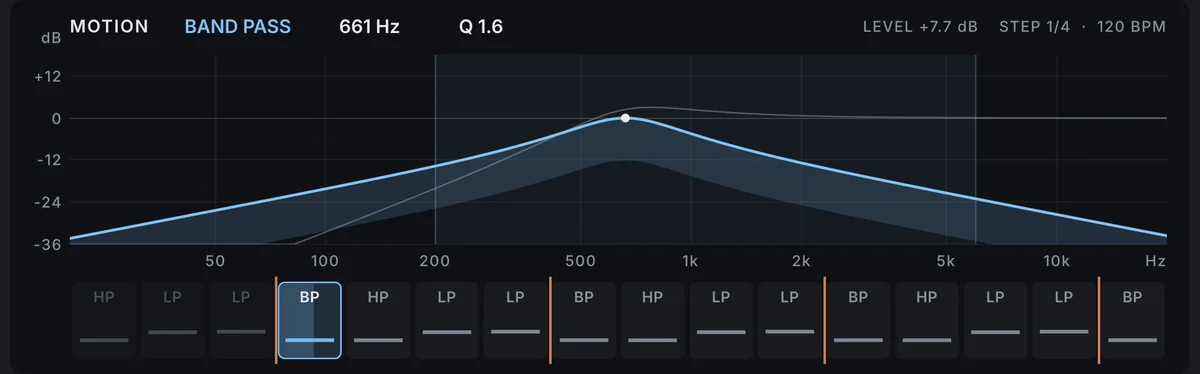
The MOTION display: the filter now in blue with its cutoff dot, the next step in grey, the shaded LOW to HIGH range, and the STEPS lane underneath.

Locked to the song

Each step is worked out from where the song is, not from when you pressed play: step 12 of the song always gets the same filter. So every playback and every bounce sounds the same, a looped section loops with the same filters, and starting playback in the middle of the song gives the step that belongs there. Tempo changes are followed at once, and REPEAT counts its bars with your song’s time signature. When the transport stops, the steps keep running at the song’s tempo so you can tweak.

  • The same in every bounce
  • Starts mid-song in place
  • Follows the tempo
The SHAPES buttons with LP, HP and BP lit, the REPEAT buttons with 1 BAR lit, and PATTERN 12 with NEW.

Patterns you can keep

A pattern is a number from 1 to 999. Press NEW until one grooves with the part; the number is saved with your session and in your presets, so a pattern you like comes back exactly, next week or next year. REPEAT loops it every 1, 2 or 4 bars, so the movement becomes a riff the ear can follow, and the STEPS lane under the display shows the pattern around the step that’s playing, with a mark where the loop starts again.

  • 999 patterns
  • REPEAT 1, 2 or 4 bars
  • Saved with the session
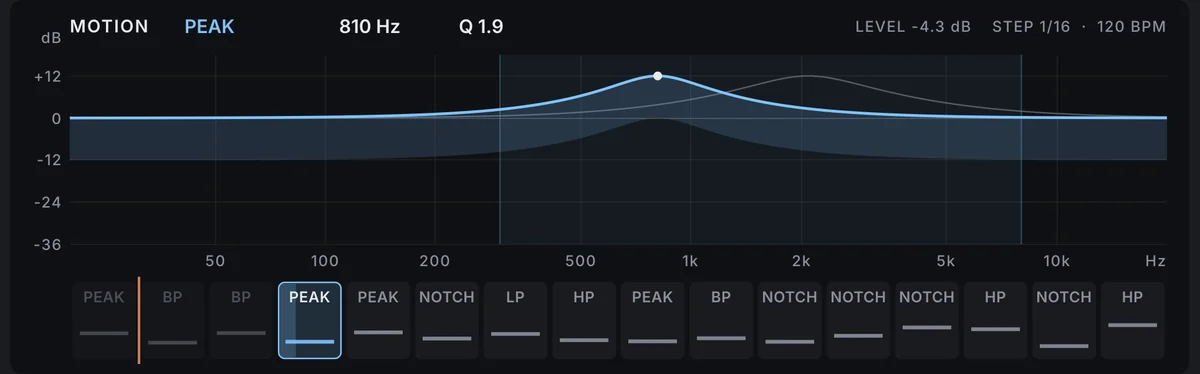
The MOTION display with Sixteenth Gate: a PEAK step at 810 Hz, LEVEL -4.3 dB, and the STEPS lane with all five shapes at 1/16.

Five shapes that morph

LOW PASS for darker, HIGH PASS for thinner, BAND PASS for the telephone and wah sound, NOTCH for a phaser-like hole and PEAK for a vowel-like boost of 12 dB. Light one for a single kind of movement, or several for contrast from step to step. The shape glides with the cutoff and the resonance, so a change from a low pass to a band pass is a smooth morph, and even at GLIDE 0 % each change takes 3 ms, so nothing clicks.

  • LP, HP, BP, NOTCH, PEAK
  • Shapes morph
  • No clicks
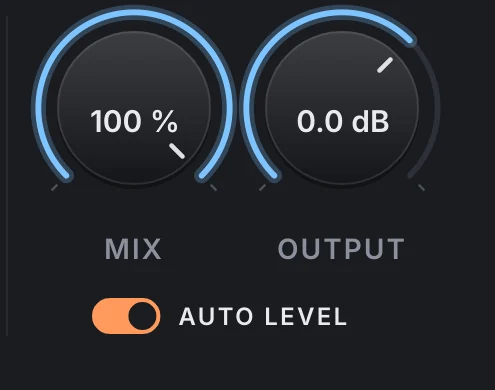
MIX at 100 %, OUTPUT at 0.0 dB and the AUTO LEVEL switch on.

The tone moves, not the level

A band pass at 660 Hz takes about 21 dB off a drum kit; without help, a moving filter is mostly a moving volume. AUTO LEVEL follows your track’s tone and gives every filter setting the gain that keeps it as loud as it came in, within 24 dB. The gain moves with the filter, not with the signal, so it never pumps, and a peak guard keeps it from pushing peaks more than 3 dB over the input’s own. Every factory preset keeps the input’s loudness within 0.3 dB on the material it was made for.

  • AUTO LEVEL
  • No pumping
  • Peak guard
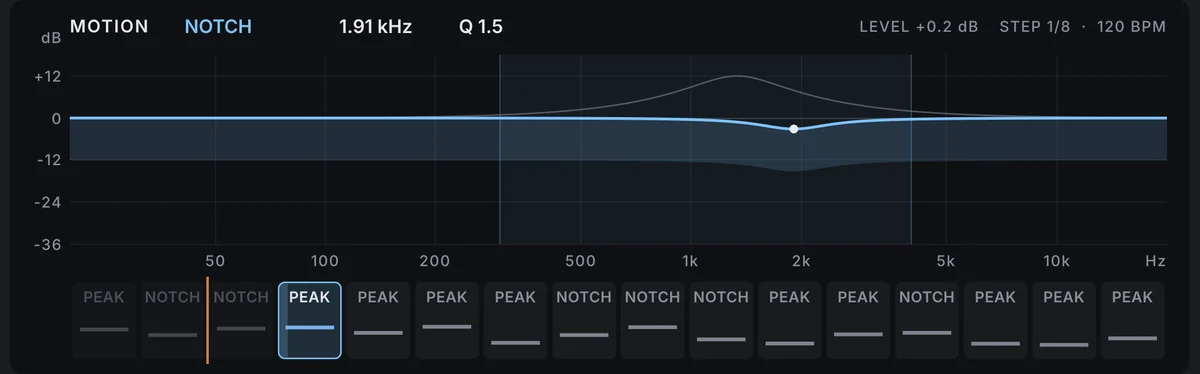
The MOTION display with Phase Steps: a notch morphing towards a peak, the next step’s peak in grey, and the STEPS lane of notches and peaks at 1/8.

From hard cuts to endless sweeps

GLIDE sets how much of each step the filter takes to reach the next setting. At 0 % it jumps, for a chopped, gated rhythm; at 10 to 40 % it slides into each step and holds, the classic rhythmic filter; at 50 to 80 % it sweeps through most of the step; at 100 % it never stops moving, a sweep that wanders with the song. The glide is a share of the step, so it follows RATE and the tempo.

  • Jumps to sweeps
  • Follows the tempo
  • Eased in and out
The STEPS lane: three past steps, the playing band pass step lit, and twelve to come, each with its shape and its cutoff, with orange marks where the one-bar loop starts again.

See the pattern before you hear it

The MOTION display draws the filter now, in blue with its cutoff dot, and the next step’s filter in grey, over the LOW to HIGH range, from 20 Hz to 20 kHz. Above it, the shape, the cutoff, the Q, AUTO LEVEL’s gain and the step length at the song’s tempo. Underneath, the STEPS lane shows three steps back, the step playing, filling as it goes, and twelve to come, each with its shape and its cutoff, so you can see what NEW or CHAOS did before you listen.

  • Now and next
  • 16 steps in view
  • Loop marks
The preset browser showing Drums: Beat Filter, with previous, next and SAVE.

38 presets, each one measured

Ten folders: Drums, Bass, Guitar, Keyboards, Vocals and Mix Bus for the job, Rhythmic for sixteenths, triplets and dotted steps, Sweeps for endless movement, and Creative FX from robotic chatter to underwater steps. Each was measured through the real processor at 120 BPM on a drum kit, a mix, a synth bass, a strummed guitar and keys. There is no latency, MIX blends with the dry signal exactly, and at MIX 0 % the output is the input, bit for bit.

  • 10 folders
  • No latency
  • Save your own

Get VEIRA Motion Filter

Pay once and it’s yours, with every future update included.

VEIRA Motion Filter

A filter that moves with your song: a new shape, cutoff and resonance on every step, gliding between them, locked to the song’s position and kept at your track’s loudness.

  • Yours to keep: pay once, no subscription
  • Every future update, free for life
  • VST3, AU, Standalone on up to 3 computers
  • Changed your mind? Cancel within 14 days (refunds)
USD

One-time payment, in your cart.

Welcome offer

Get 10% off your first order

Leave your email and we’ll send you a code for 10% off your first order, on any plugins. One code per person.

Specifications

Type
A rhythmic filter: a filter whose shape, cutoff and resonance change on every step of the song, gliding between them, locked to the song’s position
Filter
State-variable, 12 dB per octave, mixed into LOW PASS, HIGH PASS, BAND PASS, NOTCH or PEAK (+12 dB); cutoff, Q and shape glide together, at least 3 ms
Rate
1/32, 1/16T, 1/16, 1/8T, 1/8, 1/4T, 1/8D, 1/4, 1/4D, 1/2 or 1/1, shortest to longest (default 1/4), at the song’s tempo; 120 BPM without a host tempo
Chaos
0 to 100 % (default 50 %): how far the cutoffs spread from the middle of the range, and how much the resonance varies
Range
LOW 20 Hz to 2 kHz (default 200 Hz), HIGH 500 Hz to 20 kHz (default 5 kHz)
Resonance
0 to 100 % (default 40 %): Q 0.6 to 12
Glide
0 to 100 % of a step (default 30 %)
Pattern
1 to 999 (default 1), NEW for another; REPEAT Off, 1, 2 or 4 bars, from the host’s time signature
Level
AUTO LEVEL (default on): the gain that keeps the input’s loudness through each filter setting, within ±24 dB, with a peak guard at 3 dB over the input’s recent peak; every factory preset within 0.3 dB on its main source
Mix
0 to 100 % (default 100 %): a linear blend with the dry signal; at 0 % the output is the input, bit for bit
Output
−24 to +12 dB
Latency
None
Metering
MOTION display (the filter now and on the next step, 20 Hz to 20 kHz, with shape, cutoff, Q, AUTO LEVEL’s gain and the step length); STEPS lane (16 steps around the one playing); IN and OUT peak and RMS; short-term and integrated LUFS
Presets
38 factory presets in 10 folders (Default, Drums, Bass, Guitar, Keyboards, Vocals, Mix Bus, Rhythmic, Sweeps, Creative FX), plus your own
Channels
Mono or stereo (the same filter on both sides)
CPU (measured)
About 1 % of one core of a 2-core cloud machine (stereo, 48 kHz)
Formats
VST3, AU, Standalone
macOS
macOS 11 or later, Apple silicon or Intel (universal). VST3, AU and Standalone.
Windows
Windows 10 or later, 64-bit. VST3 and Standalone.
Pro Tools
Pro Tools (AAX) versions are built and tested, and arrive once they’re signed for Pro Tools.
Latest version
0.2.0, released October 30, 2026 · What’s new
Read more on the blog: Rhythmic filter movement: bringing a static loop or pad to life · Movement and automation: keeping a mix alive from intro to outro

Questions? 7 answers about VEIRA Motion Filter

Works well with

VEIRA Mod Drive

A drive pedal into a modulation pedal in one vintage unit: grit that doesn’t get louder, then chorus, flanger, phaser, tremolo or vibrato, free or locked to the song.

$39.99

VEIRA EQ

A dynamic equaliser with up to 24 bands and an analyzer you can read.

$149.99

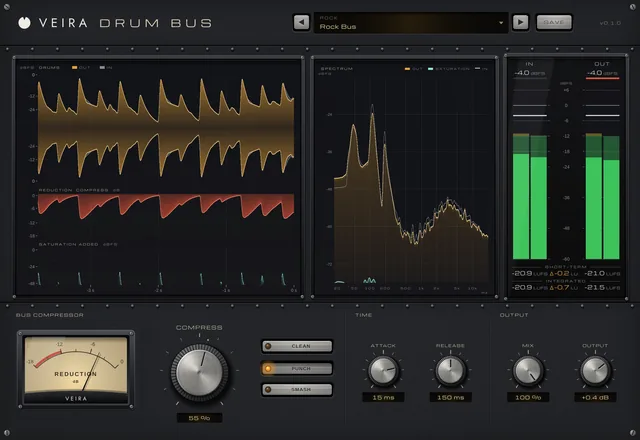
VEIRA Drum Bus

A drum bus compressor with few controls and a hidden EQ: one big knob glues, punches or smashes the kit, at the level it came in.

$149.99