VEIRA Clean Up

Take the room tone, hiss, hum, fans and traffic out from under a voice or an instrument with one knob. It learns the background by itself, in the pauses, and LISTEN plays exactly what goes.

$29.99, a one-time purchase with free updates

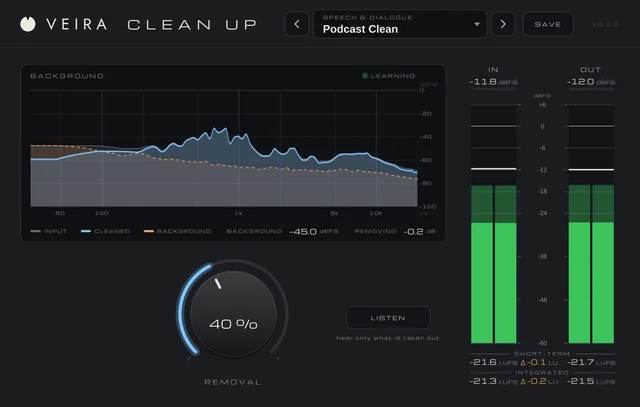
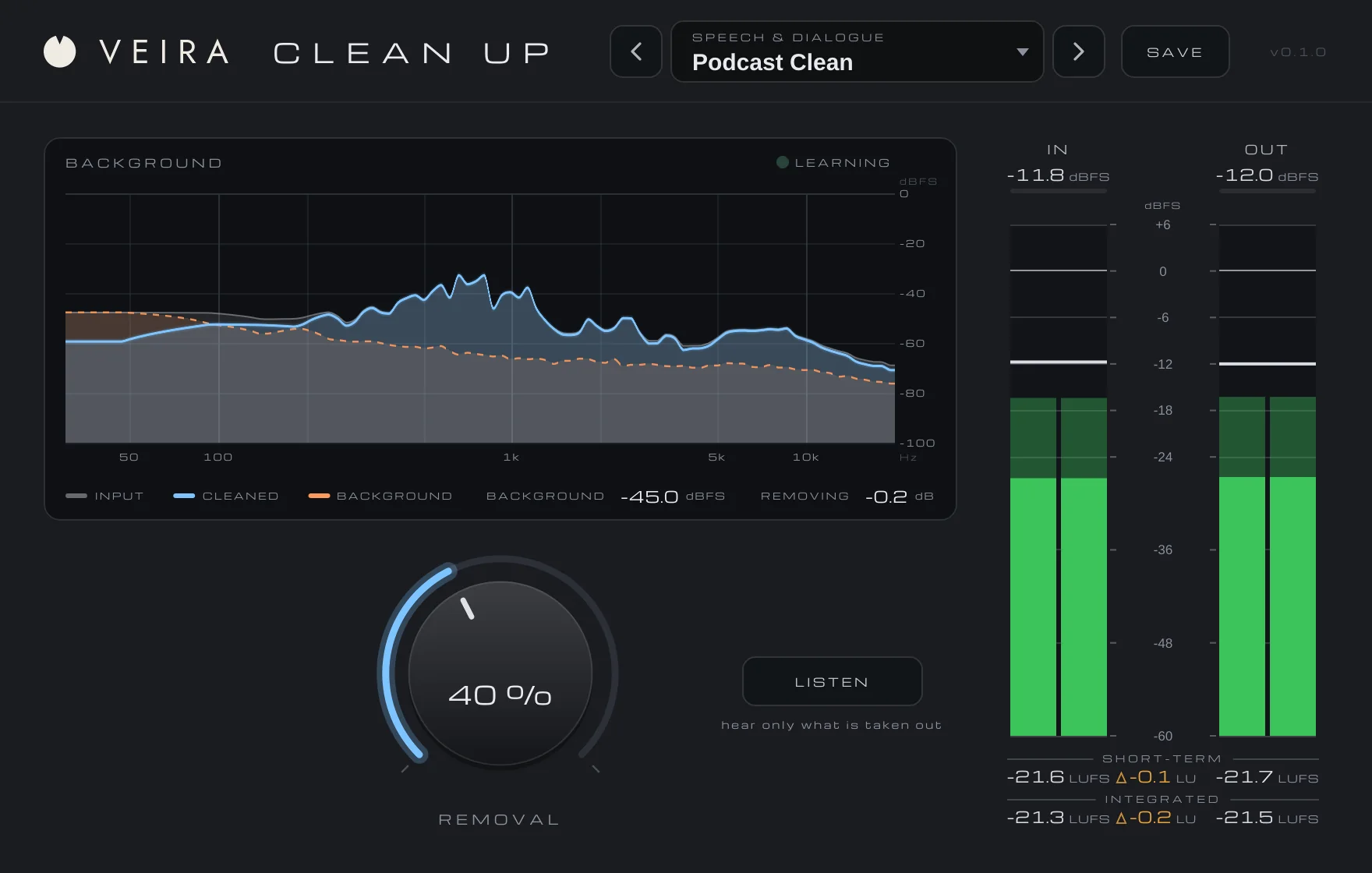
VEIRA Clean Up with the preset Podcast Clean while a voice plays over hiss and hum: the BACKGROUND display with the input, the cleaned output and the learnt background from 30 Hz to 20 kHz, the LEARNING lamp and the BACKGROUND and REMOVING read-outs; the REMOVAL knob at 40 % with the LISTEN button; and the IN and OUT meters with loudness.

VEIRA Clean Up takes the background out of a recording: the room tone, the hiss of a preamp or a tape, the hum of a mains supply or an amp, a computer fan, the air-conditioning, the traffic outside. One knob, REMOVAL, sets how much of it goes, from a polish on a good recording to a voice-over that sits on silence, and the voice or the instrument keeps its level and its tone. There is no noise print to take: the plugin learns the background by itself, in the pauses, and keeps that picture up to date while the recording plays. LISTEN plays only what is being taken out, so you can check that no part of the voice is going with it, and the BACKGROUND display shows the input, the cleaned output and the background it has learnt.

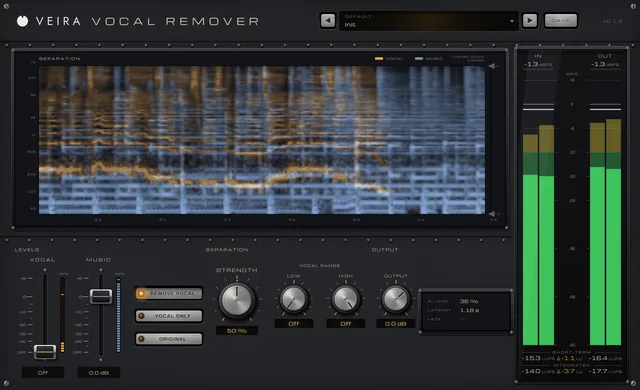
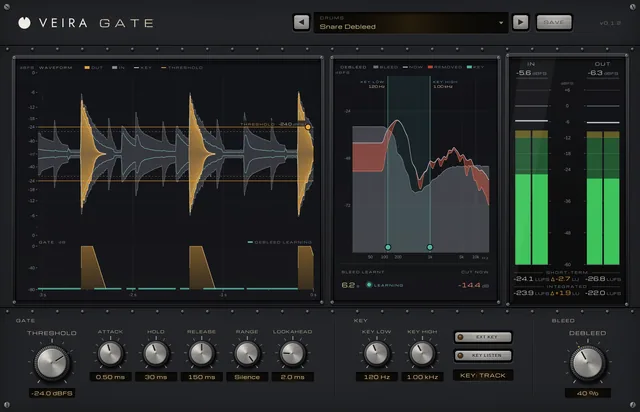
It is the opposite job from VEIRA Vocal Remover, which takes the voice out of a finished song for a karaoke track or an a cappella: VEIRA Clean Up takes the background out from under a voice. And it is not a gate. VEIRA Gate mutes the track between the words and leaves it alone while the voice plays, so the background is still there under every word; VEIRA Clean Up works frequency by frequency, cleans under the words too, and never cuts a word short, because breaths and the tails of words rise above its picture of the background and stay. Sound that never pauses, a held note or a dense mix, has no background to learn from and passes through unchanged.

A tour of VEIRA Clean Up

VEIRA Clean Up with the preset Podcast Clean while a voice plays over hiss and hum: the BACKGROUND display with the input, the cleaned output and the learnt background from 30 Hz to 20 kHz, the LEARNING lamp and the BACKGROUND and REMOVING read-outs; the REMOVAL knob at 40 % with the LISTEN button; and the IN and OUT meters with loudness.
  1. The whole of VEIRA Clean Up

    VEIRA Clean Up is a background sound remover with one knob. REMOVAL sets how much of the room tone, hiss, hum, fans and traffic is taken out of a voice or an instrument: 10 dB at 25 %, 20 dB at 50 %, 40 dB at 100 %, and under the voice only what is clearly background. There is no noise print to take: the plugin learns the background by itself in the pauses, keeps that picture up to date while the recording plays, and leaves sound without pauses alone. LISTEN plays only what is being taken out, and the BACKGROUND display shows the input, the cleaned output and the background it has learnt, with its level and how much is going right now.

  2. The background

    The input, the cleaned output and the background the plugin has learnt, 30 Hz to 20 kHz, with its level and how much is going.

  3. Voice and background

    Where the voice is, the cleaned trace sits on the input; where there is only background, it drops to the floor.

  4. Removal

    The one knob: 10 dB off at 25 %, 20 at 50 %, 40 at 100 %. Most voices sit between 30 and 60 %.

  5. Listen

    Hear only what is being taken out, to check the voice isn’t in it.

  6. In and out

    Peak and RMS for the input and the output, with short-term and integrated loudness.

What VEIRA Clean Up does for you

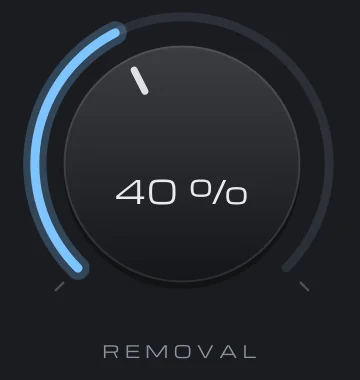
The REMOVAL knob at 40 %, its value inside the cap and a lit arc showing how far it is turned.

One knob: how much of the background goes

REMOVAL sets the floor, the most any frequency is turned down: 0.4 dB for every percent, so 10 dB at 25 %, 20 dB at 50 % and 40 dB at 100 %. In the pauses the background goes down by exactly that; under the voice only what is clearly background goes, so the voice keeps its level and its tone. Measured on a spoken voice over hiss and hum 33 dB under it, at 50 %: the gaps between words down 16.5 dB, the voice within 0.4 dB. At 0 % the output is the input, bit for bit, only delayed; moves to and from it crossfade over 20 ms, and the knob can be automated.

  • 10, 20 or 40 dB off
  • Voice within 0.4 dB
  • Bit for bit at 0 %
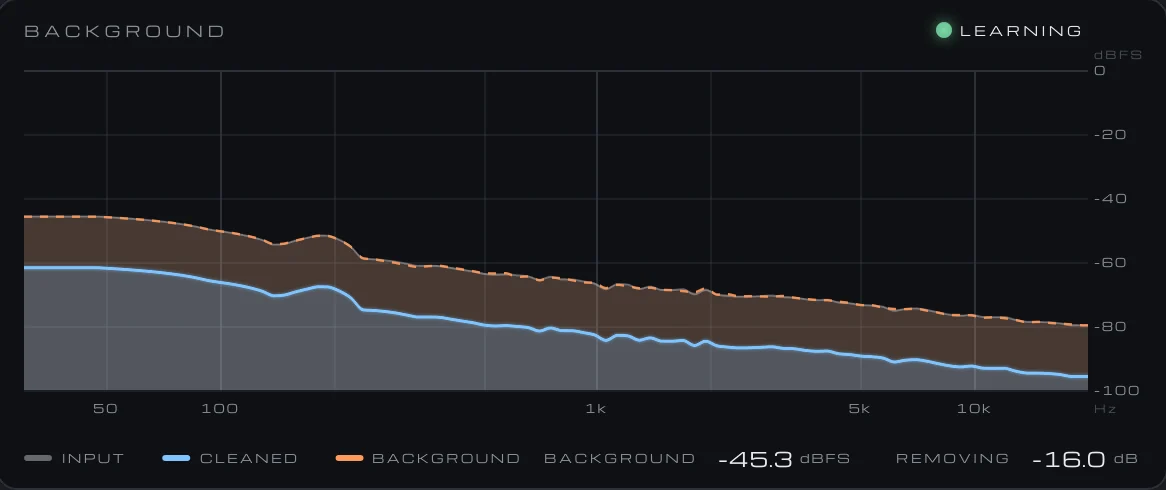
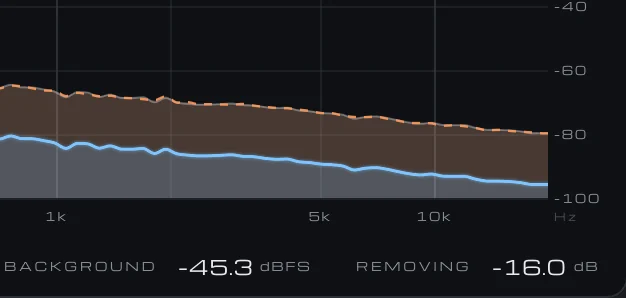
The BACKGROUND display in a pause: LEARNING lit, the cleaned output a steady 16 dB under the input across the whole range, the learnt background running along the input, and the read-outs BACKGROUND −45.3 dBFS and REMOVING −16.0 dB.

It learns the background by itself

There is no noise print to take. The plugin listens for the pauses, the moments when the microphone hears only the room, and takes its picture of the background there, frequency by frequency: a moment counts as a pause when it is within 6 dB of the quietest moment of the last three to six seconds and either 12 dB under the loudest or under −40 dBFS in itself. A pause of about a second is enough to start, LEARNING lights while it listens, and the picture follows the background within a tenth of a second at every pause, so a fan that speeds up or traffic that builds is tracked. Between pauses the picture is kept as it is. A quiet background is learnt from the first moment; a loud one, over −40 dBFS, at the first pause after the voice begins.

  • No noise print
  • A pause of a second
  • Updated at every pause
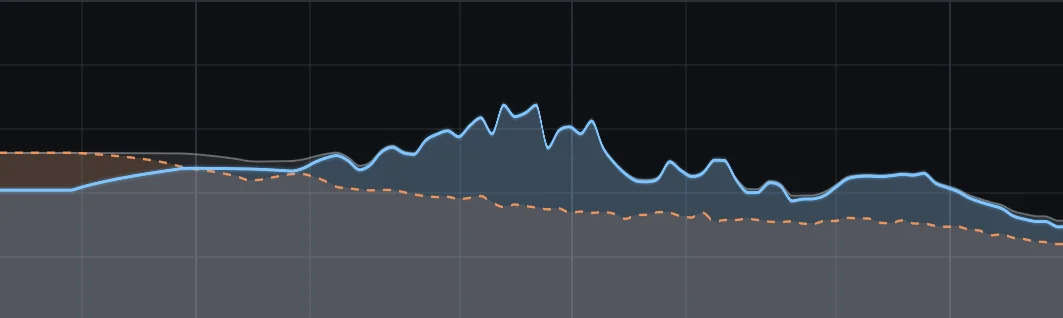
The three traces of the BACKGROUND display: the voice’s peaks in the cleaned output riding on the input, and the learnt background dashed underneath.

Sound without pauses is left alone

A held note, a strummed guitar that never stops, a dense mix: nothing in them ever drops 12 dB under the loudest moment, so no moment counts as a pause, no background is learnt and the sound passes through unchanged at any REMOVAL (within 0.1 dB per second, tested). Within a pause the plugin is careful too: a frequency that sits well over its own recent minimum is a breath or the tail of a word, and is left out of the picture. That is also what a gate can’t do: a gate mutes between the words and leaves the background under them; VEIRA Clean Up takes it out from under the words as well, and never cuts a word short.

  • Held notes untouched
  • Breaths and tails kept
  • Under the words too
The LISTEN button: hear only what is taken out.

Hear exactly what goes

LISTEN plays the input minus the cleaned output: only what is being taken out. What you want to hear is the background alone, a steady hiss, a hum, the room; if you can make out words or the ring of a note, REMOVAL is too high, and you turn it down until they disappear. LISTEN is a listening aid, not a setting: it is never saved in a preset, it can’t be automated, and it switches itself off when the host renders offline, so it can’t end up in an export by accident. The REMOVING read-out keeps measuring the cleaned output while you listen.

  • Input minus output
  • Off in offline renders
  • Never in a preset
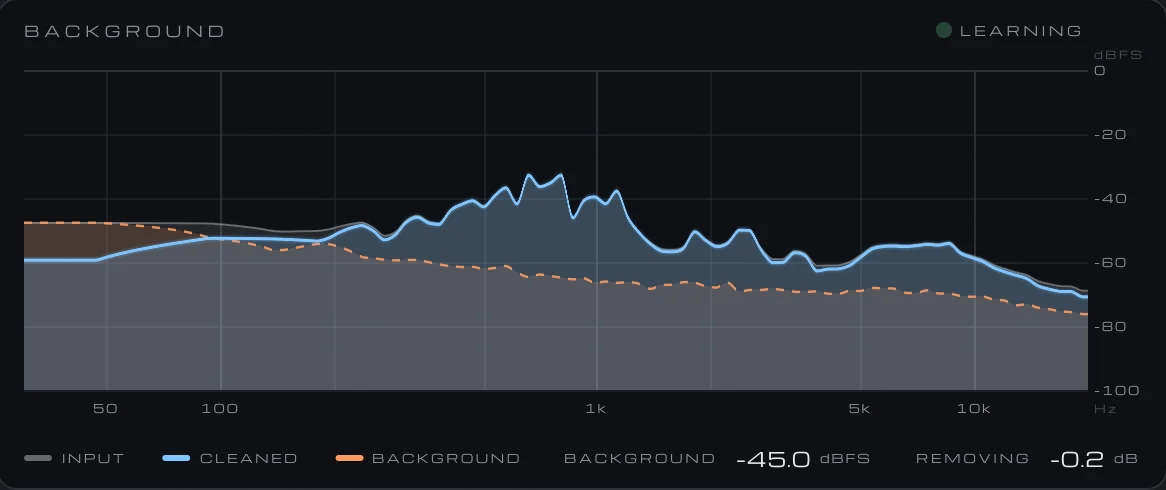
The BACKGROUND display while a voice plays: the input in grey, the cleaned output in blue and the learnt background as an orange dashed line, from 30 Hz to 20 kHz, with the LEARNING lamp, the legend and the read-outs BACKGROUND −45.0 dBFS and REMOVING −0.2 dB.

See the background you are removing

The BACKGROUND display draws three traces from 30 Hz to 20 kHz on a musical scale, against a level scale from 0 to −100 dBFS: the input in grey, the cleaned output in blue and the background the plugin has learnt in orange, dashed. Where the voice is, the cleaned trace sits on the input; where there is only background, it drops to the floor. The BACKGROUND read-out gives the learnt background’s level in dBFS, REMOVING how much quieter the output is than the input right now, and LEARNING lights at every pause. Hovering reads the input, output and background levels at any frequency.

  • Three traces
  • 30 Hz to 20 kHz
  • Hover read-out
The right half of the BACKGROUND display in a pause: the cleaned output 16 dB under the input, and the read-outs BACKGROUND −45.3 dBFS and REMOVING −16.0 dB.

No watery residue

Older noise reducers leave the background’s own random peaks flickering through as a bubbling, watery residue. VEIRA Clean Up reads how much of what it hears is voice over five neighbouring frequencies, over 33 and over the whole frame, and where nothing is present the gain is exactly the floor, so nothing flickers; where the voice is, a Wiener filter on a decision-directed estimate of the voice’s share keeps it, smoothed from one frame to the next and across neighbouring frequencies. A stereo recording is analysed as one and both sides get the same gain, so the stereo image never moves. Hum and its harmonics are learnt like any other background and go without a setting.

  • Exactly the floor in the pauses
  • Stereo linked
  • Hum and harmonics too
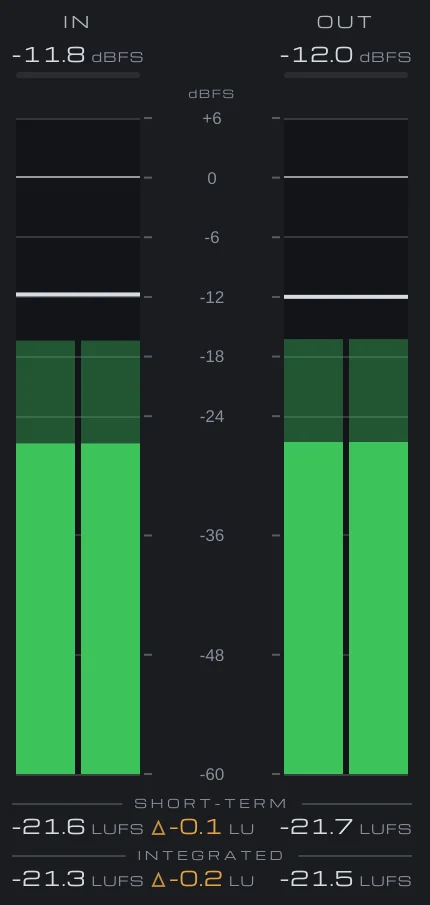
The meter bridge: IN and OUT peak and RMS in dBFS, with short-term and integrated loudness in LUFS and the difference in LU.

21 ms, constant, and bit for bit when idle

The latency is one analysis frame, 1,024 samples at 44.1 and 48 kHz (21 ms at 48 kHz), 2,048 at 88.2 and 96 kHz, 4,096 at 176.4 and 192 kHz, reported to your DAW and never changing, so compensation holds on playback and in bounces. Bypassed, the plugin delays the sound by the same amount and keeps listening, so it still knows the background when you switch it back in. It costs about 2 % of one core in stereo at 48 kHz, so it can sit on every voice track of an episode. The IN and OUT meters show peak and RMS with short-term and integrated loudness, and the difference in LU reads how much went.

  • 1,024 samples
  • Bypass keeps listening
  • About 2 % of a core
The preset browser showing Speech & Dialogue: Podcast Clean, with previous, next and SAVE.

27 presets, each one measured

Seven folders sorted by what is being cleaned: Speech & Dialogue (Light Touch to Silence Between Lines), Vocals, Instruments (Acoustic Guitar, Piano, Amp Hum, Brass & Winds, Drum Overheads), Field & Location (Outdoor Interview, Room Tone, Nature Recording, Camera Mic), Music & Mixes (Stem Clean, Old Tape Transfer, Sample Clean, Whole Mix Safe) and Restoration (Hiss, Hum & Buzz, Computer Fan, Maximum). Each is one REMOVAL for a situation, measured on the real plugin on a voice or an instrument over a background at the level its folder expects: the sound kept within 0.3 dB (1 dB on loud location backgrounds), the background alone down by exactly the floor. Each note says how much comes off and what to listen for.

  • 7 folders
  • Measured on the plugin
  • Save your own

Get VEIRA Clean Up

Pay once and it’s yours, with every future update included.

VEIRA Clean Up

Take the room tone, hiss, hum, fans and traffic out from under a voice or an instrument with one knob. It learns the background by itself, in the pauses, and LISTEN plays exactly what goes.

  • Yours to keep: pay once, no subscription
  • Every future update, free for life
  • VST3, AU, Standalone on up to 3 computers
  • Changed your mind? Cancel within 14 days (refunds)
USD

One-time payment, in your cart.

Welcome offer

Get 10% off your first order

Leave your email and we’ll send you a code for 10% off your first order, on any plugins. One code per person.

Specifications

Type
Background sound remover: one knob, REMOVAL, sets how much of the room tone, hiss, hum, fans and traffic is taken out from under a voice or an instrument; the background is learnt automatically in the pauses
Removal
0 to 100 % (default 50 %). The floor is 0.4 dB per percent: −10 dB at 25 %, −20 dB at 50 %, −40 dB at 100 %. In a pause the background goes down by exactly the floor; under the voice only what is clearly background
Learning
A frame counts as a pause when it is within 6 dB of the quietest frame of the last 3 to 6 s and either 12 dB under the loudest or under −40 dBFS (100 Hz to 8 kHz). In a pause the picture of the background follows it within 0.1 s, frequency by frequency; between pauses it is kept. Sound that never pauses is left unchanged
Measured
A spoken voice at −12 dBFS peak over hiss and hum at −45 dBFS, 48 kHz, REMOVAL 50 %: the gaps between words down 16.5 dB, the voice within 0.4 dB; the background alone down 10.0, 20.0 and 40.0 dB at 25, 50 and 100 %; a held tone, a strummed guitar and a dense mix unchanged within 0.1 dB per second
Listen
LISTEN plays the input minus the cleaned output (what is taken out); not saved in presets, not automatable, off when the host renders offline
Analysis
Overlapping frames of 1,024 samples (21 ms at 48 kHz) every 256 samples, sqrt-Hann analysis and synthesis; a Wiener filter on a decision-directed estimate of the voice’s share, floored by REMOVAL and smoothed across neighbouring frequencies; stereo linked (one gain for both sides, from their summed power)
Latency
1,024 samples at 44.1 and 48 kHz (23 and 21 ms), 2,048 at 88.2 and 96 kHz, 4,096 at 176.4 and 192 kHz, constant, reported to your DAW; at REMOVAL 0 % and bypassed, the input delayed by the latency, bit for bit (moves to and from 0 % crossfade over 20 ms)
Metering
BACKGROUND display (input, cleaned output and learnt background, 30 Hz to 20 kHz, 0 to −100 dBFS) with the BACKGROUND (dBFS) and REMOVING (dB) read-outs and the LEARNING lamp; IN and OUT peak and RMS; short-term and integrated LUFS
Presets
27 factory presets in 7 folders (Speech & Dialogue, Vocals, Instruments, Field & Location, Music & Mixes, Restoration), plus your own
Channels
Mono or stereo
CPU (measured)
About 2 % of one core of a 2-core cloud machine (stereo, 48 kHz)
Formats
VST3, AU, Standalone
macOS
macOS 11 or later, Apple silicon or Intel (universal). VST3, AU and Standalone.
Windows
Windows 10 or later, 64-bit. VST3 and Standalone.
Pro Tools
Pro Tools (AAX) versions are built and tested, and arrive once they’re signed for Pro Tools.
Latest version
0.2.1, released October 31, 2026 · What’s new
Read more on the blog: Cleaning up a noisy recording: hum, hiss, fans and room tone · Cleaning up tracks before mixing: noise, hum, clicks and drum bleed

Questions? 7 answers about VEIRA Clean Up

Works well with

VEIRA Vocal Remover

Take the vocal out of a song, keep only the vocal, or turn it up or down, with AI on your computer.

$29.99

VEIRA Gate

A drum and noise gate you set by eye, and it takes the bleed out of the hits.

$49.99

VEIRA Vocal Strip

A whole vocal chain in one console: nine modules in any order, from clean-up and pitch correction to compression, de-essing, echo and reverb, each with its own display.

$149.99