VEIRA Vocal Remover

Take the vocal out of a song, keep only the vocal, or turn it up or down, with AI on your computer.

$29.99, a one-time purchase with free updates

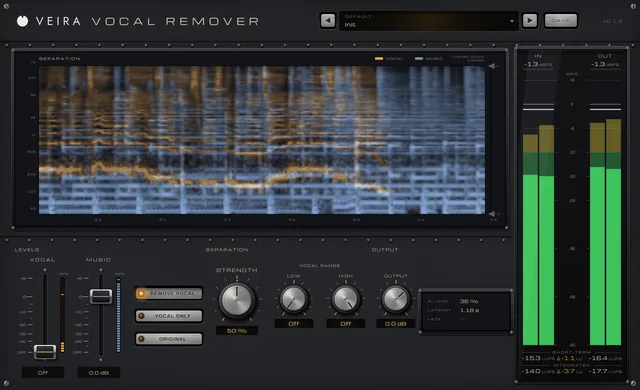
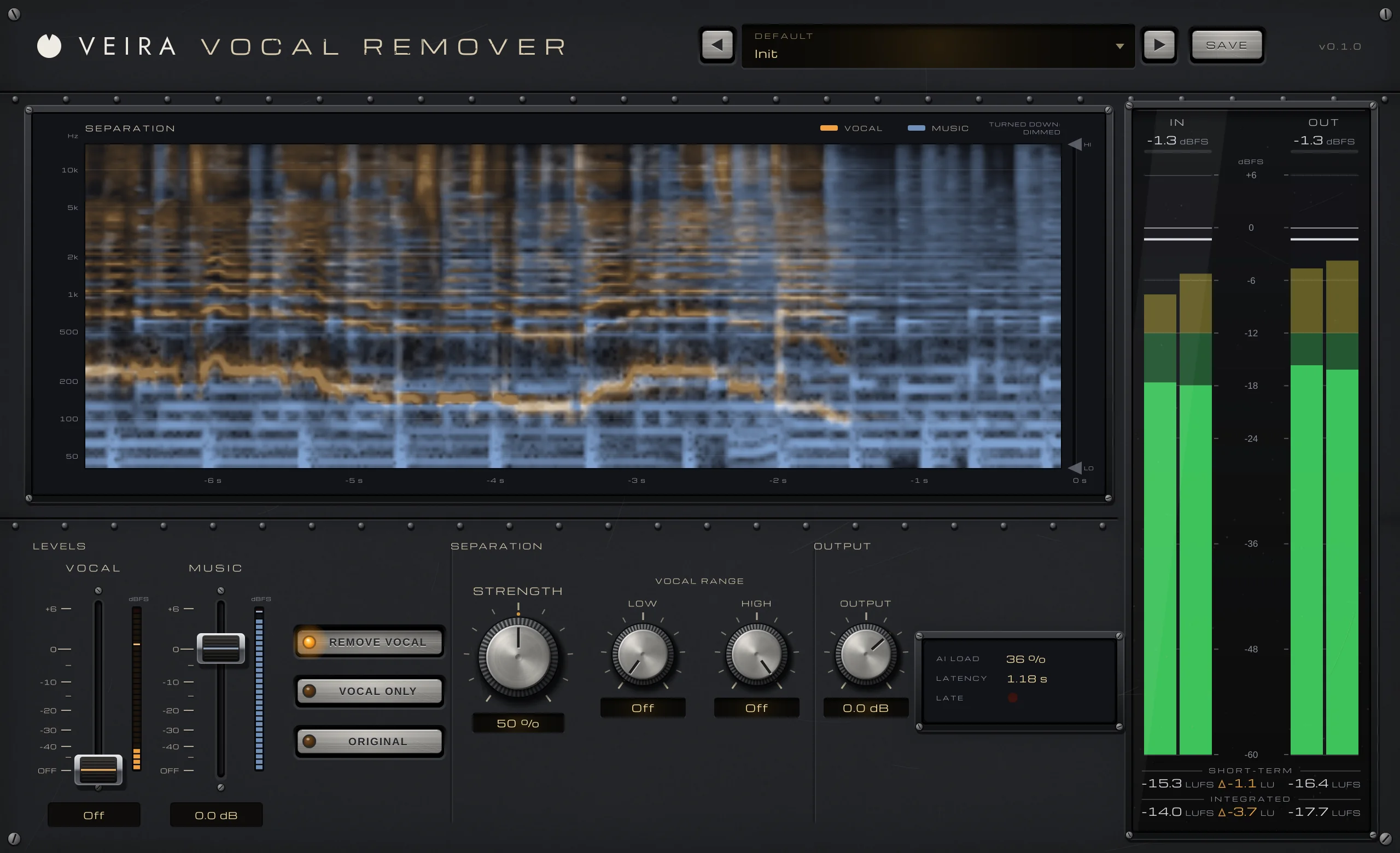
VEIRA Vocal Remover with the Init preset while a song plays: the SEPARATION display with the vocal in amber over the music in blue, the VOCAL and MUSIC faders with REMOVE VOCAL lit, STRENGTH and the VOCAL RANGE knobs, OUTPUT with AI LOAD and LATENCY, and the IN and OUT meters with loudness.

VEIRA Vocal Remover takes the vocal out of a finished song, keeps only the vocal, or turns it up or down inside the mix. An AI model listens to the song and splits it into vocal and music, and two console faders, VOCAL and MUSIC, set how loud each part comes back: a karaoke track or an instrumental with one click, an a cappella with another, or a vocal a few dB louder or quieter in a song you can’t open up.

What sets it apart is that it runs on your own computer, in any DAW, with nothing uploaded and no internet. The model is Spleeter, from Deezer’s research team, run by the plugin’s own code in real time. With both faders at 0 dB the song passes bit for bit, STRENGTH and the VOCAL RANGE steer what the AI may take, and the SEPARATION display shows what it hears. It looks about 1.18 seconds ahead, which your DAW compensates on playback, and it works best on sung vocals.

A tour of VEIRA Vocal Remover

VEIRA Vocal Remover with the Init preset while a song plays: the SEPARATION display with the vocal in amber over the music in blue, the VOCAL and MUSIC faders with REMOVE VOCAL lit, STRENGTH and the VOCAL RANGE knobs, OUTPUT with AI LOAD and LATENCY, and the IN and OUT meters with loudness.
  1. The whole of VEIRA Vocal Remover

    VEIRA Vocal Remover splits a finished stereo song into its vocal and everything else, with an AI separation model that runs inside the plugin, on your computer. Two console faders, VOCAL and MUSIC, set how loud each part comes back: VOCAL off for a karaoke track or an instrumental, MUSIC off for an a cappella, anything between to turn a vocal up or down. STRENGTH sets how firmly the model decides what is voice, the VOCAL RANGE keeps the kick, bass and cymbals out of it, and the SEPARATION display shows the vocal in amber and the music in blue.

  2. What the AI hears

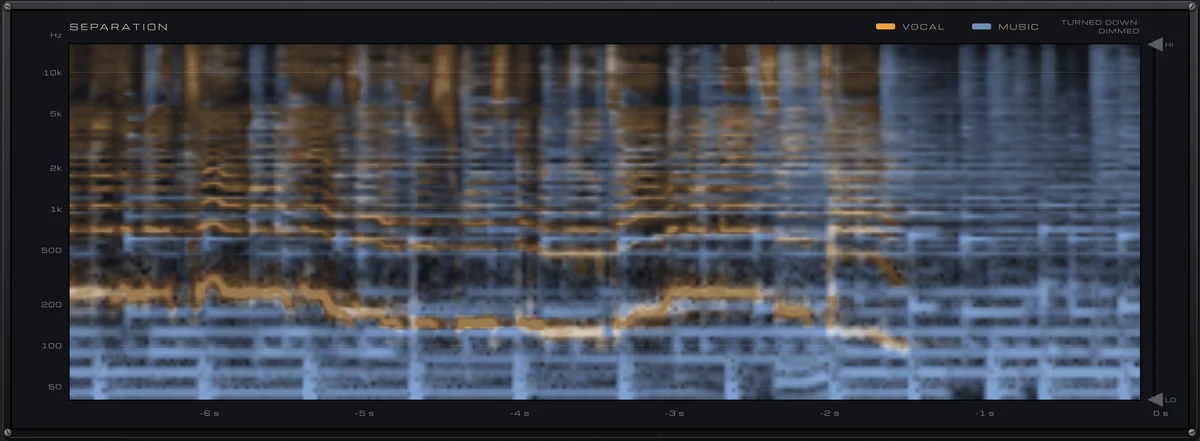
    The song’s last six seconds by pitch: the vocal in amber, the music in blue, a part you turn down dimmed.

  3. Vocal and music

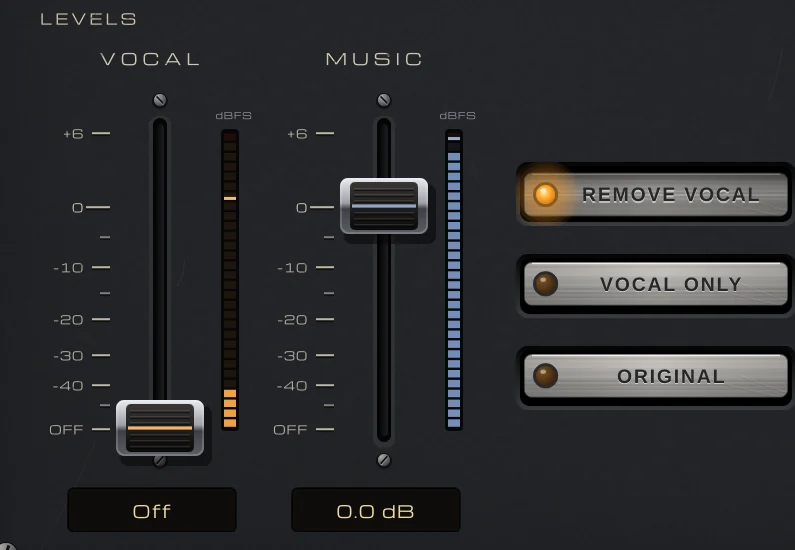
    Two faders, Off to +6 dB, with a level column each; one click for REMOVE VOCAL, VOCAL ONLY or ORIGINAL.

  4. Separation

    STRENGTH sets how firmly the AI decides what is voice; the VOCAL RANGE keeps the lows and highs out of it.

  5. Output and status

    OUTPUT, how hard the AI is working, the latency your DAW compensates, and the LATE lamp.

  6. In and out

    Peak and RMS for the input and the output, with short-term and integrated loudness.

What VEIRA Vocal Remover does for you

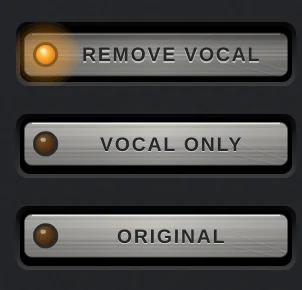
The REMOVE VOCAL, VOCAL ONLY and ORIGINAL buttons, REMOVE VOCAL lit.

Take the vocal out, or keep only the vocal

Two console faders set the two parts: VOCAL for the voice the AI finds and MUSIC for everything else, each from Off to +6 dB. REMOVE VOCAL, VOCAL ONLY and ORIGINAL set both in one click, for a karaoke track, an instrumental or an a cappella. Measured on test songs whose parts are known, the Karaoke presets leave the vocal 19 to 23 dB down with the music within 0.6 dB, and the A Cappella presets keep the band’s bleed 20 to 27 dB down.

  • Vocal 19 to 23 dB down
  • Music within 0.6 dB
  • One-click settings
LEVELS: the VOCAL fader at Off and the MUSIC fader at 0.0 dB, each with its level column, and the REMOVE VOCAL, VOCAL ONLY and ORIGINAL buttons.

Turn a vocal up or down in a finished mix

Between the two, the faders rebalance a song that was mixed without you. The Vocal Balance presets lift a vocal 1.5, 3 or 6 dB or lower it 1.5 to 10 dB, each measured within 0.1 dB of its name (Vocal Up 6 dB gives +5.6 dB) with the music within 0.5 dB. About 0.8 dB of a vocal is never separated, so the fader moves a little further than the voice and removal bottoms out about 21 dB down. There is no peak protection: lower OUTPUT when you turn a vocal up on a loud master.

  • VOCAL up to +6 dB
  • Within 0.1 dB of the preset
  • Music within 0.5 dB
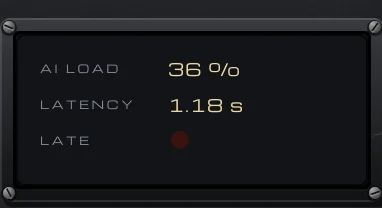
The status panel: AI LOAD 36 %, LATENCY 1.18 s and the LATE lamp, unlit.

AI that stays on your computer

The separation is Spleeter, Deezer’s open-source model (MIT licence): two neural networks, run by the plugin’s own code. There is no internet, no upload and no AI framework to install. It runs in real time on a background thread, with AVX2 on Intel and AMD and Apple’s Accelerate on Macs; AI LOAD shows how much of its time it uses, silence costs nothing, and every instance shares one copy of the model. The LATE lamp lights if a busy computer ever fell behind; an offline bounce never does.

  • Spleeter (MIT licence)
  • No internet, no upload
  • One model for every instance
The SEPARATION display: the last six seconds of a song from 40 Hz to 16 kHz, the sung melody in amber over the band in blue, with the VOCAL RANGE grips HI and LO on the right edge.

See what the AI hears

The SEPARATION display scrolls the last six seconds of the song from 40 Hz to 16 kHz, coloured by what the model decides: amber for the vocal, blue for the music. A part you turn down is drawn dimmer, the area outside the VOCAL RANGE is shaded, and hovering reads the vocal and music levels at any moment and pitch.

  • Vocal amber, music blue
  • 40 Hz to 16 kHz
  • Hover read-out
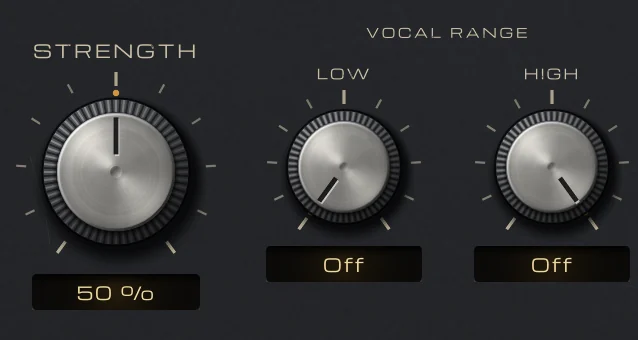
STRENGTH at 50 % and the VOCAL RANGE knobs LOW and HIGH, both off.

Decide how firmly it separates

STRENGTH sets how much of the sound counts as voice. 50 % is the model’s own balance and measured best both ways, and 35 to 70 % is a plateau where it is a matter of taste. Higher takes more of a vocal’s reverb, breaths and doubles but costs the cymbals’ air (1.1 dB over 9 kHz at 50 %, 3.5 dB at 100 %); lower is gentler and leaves a faint ghost of the voice. For an a cappella it works the other way: lower means less bleed.

  • 0 to 100 %
  • Best at 50 %
  • Measured on known parts
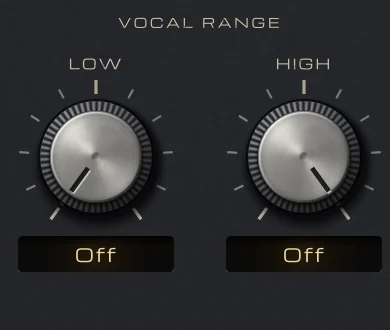
The VOCAL RANGE knobs LOW and HIGH, both off.

Keep the kick, bass and cymbals untouched

The VOCAL RANGE limits what can count as voice: below LOW (up to 1 kHz) and above HIGH (down to 1 kHz) everything stays music, untouched, with a slope of 48 dB per octave. LOW up to about 90 Hz costs a voice nothing and keeps the kick and bass clean; HIGH at 10 to 14 kHz keeps the cymbals’ air for 0.3 to 0.6 dB more vocal left. Both are grips on the SEPARATION display too.

  • 48 dB per octave
  • Drag on the display
  • Off by default
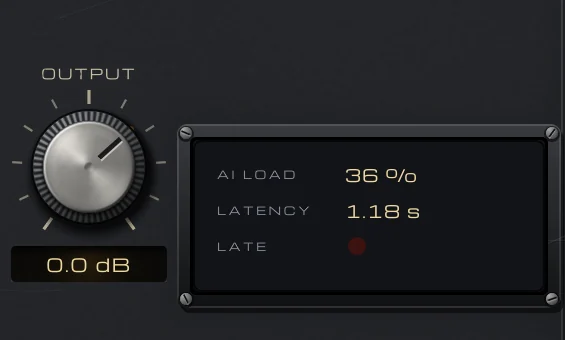
OUTPUT at 0.0 dB beside the status panel: AI LOAD 36 %, LATENCY 1.18 s and the LATE lamp.

Untouched until you ask

With VOCAL and MUSIC both at 0 dB the song comes out bit for bit, only delayed, and bypass stays in time too. The AI listens about 1.18 s ahead before it decides; your DAW compensates for that on playback and in bounces, but anything you monitor live through it arrives late, so it is made for playback, mixing and bouncing. It works best on sung vocals: a spoken voice separates only 5 to 7 dB.

  • Bit for bit at 0 dB
  • 1.18 s, compensated
  • Best on singing
The preset browser showing Default: Init, with previous, next and SAVE.

45 presets, each one measured

Eight folders sorted by job: Karaoke, A Cappella, Vocal Balance, Practice (guide vocals and play-alongs for bass, drums and guitar), Remix & Sampling, Speech and Creative FX (telephone, muffled, whisper and hollow vocals). Each was measured through the real processor on test songs whose parts are known and checked on a real master; only the three Vocal Up presets go over a master’s original peak, and their notes say how much to lower OUTPUT.

  • 8 folders
  • Save your own
  • Recalled with your session

Get VEIRA Vocal Remover

Pay once and it’s yours, with every future update included.

VEIRA Vocal Remover

Take the vocal out of a song, keep only the vocal, or turn it up or down, with AI on your computer.

  • Yours to keep: pay once, no subscription
  • Every future update, free for life
  • VST3, AU, Standalone on up to 3 computers
  • Changed your mind? Cancel within 14 days (refunds)
USD

One-time payment, in your cart.

Welcome offer

Get 10% off your first order

Leave your email and we’ll send you a code for 10% off your first order, on any plugins. One code per person.

Specifications

Type
Vocal remover: AI separation of a mixed song into vocal and music, mixed back at your levels
Model
Spleeter 2-stem by Deezer Research (MIT licence), run on your computer by the plugin’s own code; no internet, no upload
Levels
VOCAL and MUSIC faders, Off to +6 dB (0 dB at three quarters of the travel); REMOVE VOCAL, VOCAL ONLY and ORIGINAL
Strength
0 to 100 % (default 50 %, the model’s own balance)
Vocal range
LOW 20 Hz (off) to 1 kHz, HIGH 1 kHz to 20 kHz (off); 48 dB/octave beyond each
Output
−24 to +12 dB
Measured
On test songs at STRENGTH 50 %: a sung vocal removed to about −21 dB, the band’s bleed in an a cappella about −23 dB; a spoken voice separates only 5 to 7 dB
Latency
52,224 samples at 44.1 kHz, 56,925 at 48 kHz (about 1.18 s), reported to your DAW; with both faders at 0 dB and bypassed, the input delayed by the latency, bit for bit
Metering
SEPARATION display (scrolling spectrogram, 40 Hz to 16 kHz, the vocal and the music coloured); a level column per fader; AI LOAD, LATENCY and LATE; IN and OUT peak and RMS; short-term and integrated LUFS
Presets
45 factory presets in 8 folders (including Karaoke, A Cappella, Practice and Speech), plus your own
Channels
Mono or stereo
CPU (measured)
AI load about 35 to 45 % of one core of a 2-core cloud VM; much less on Apple silicon; nothing on silence. About 80 MB of memory for the model, shared by every instance
Formats
VST3, AU, Standalone
macOS
macOS 11 or later, Apple silicon or Intel (universal). VST3, AU and Standalone.
Windows
Windows 10 or later, 64-bit. VST3 and Standalone.
Pro Tools
Pro Tools (AAX) versions are built and tested, and arrive once they’re signed for Pro Tools.
Latest version
0.2.1, released October 31, 2026 · What’s new
Read more on the blog: How to pull an a cappella or an instrumental out of a finished song

Questions? 9 answers about VEIRA Vocal Remover

Works well with

VEIRA EQ

A dynamic equaliser with up to 24 bands and an analyzer you can read.

$149.99

VEIRA DeEss

A de-esser that shows you every “s”.

$149.99

VEIRA Max

A loud, clean mastering limiter that shows every decibel it takes.

$149.99