Checking a master before release: what to look at and why
What to check on a finished master before it goes out: loudness and true peak for its destination, tonal balance against references, dynamics, stereo and mono.
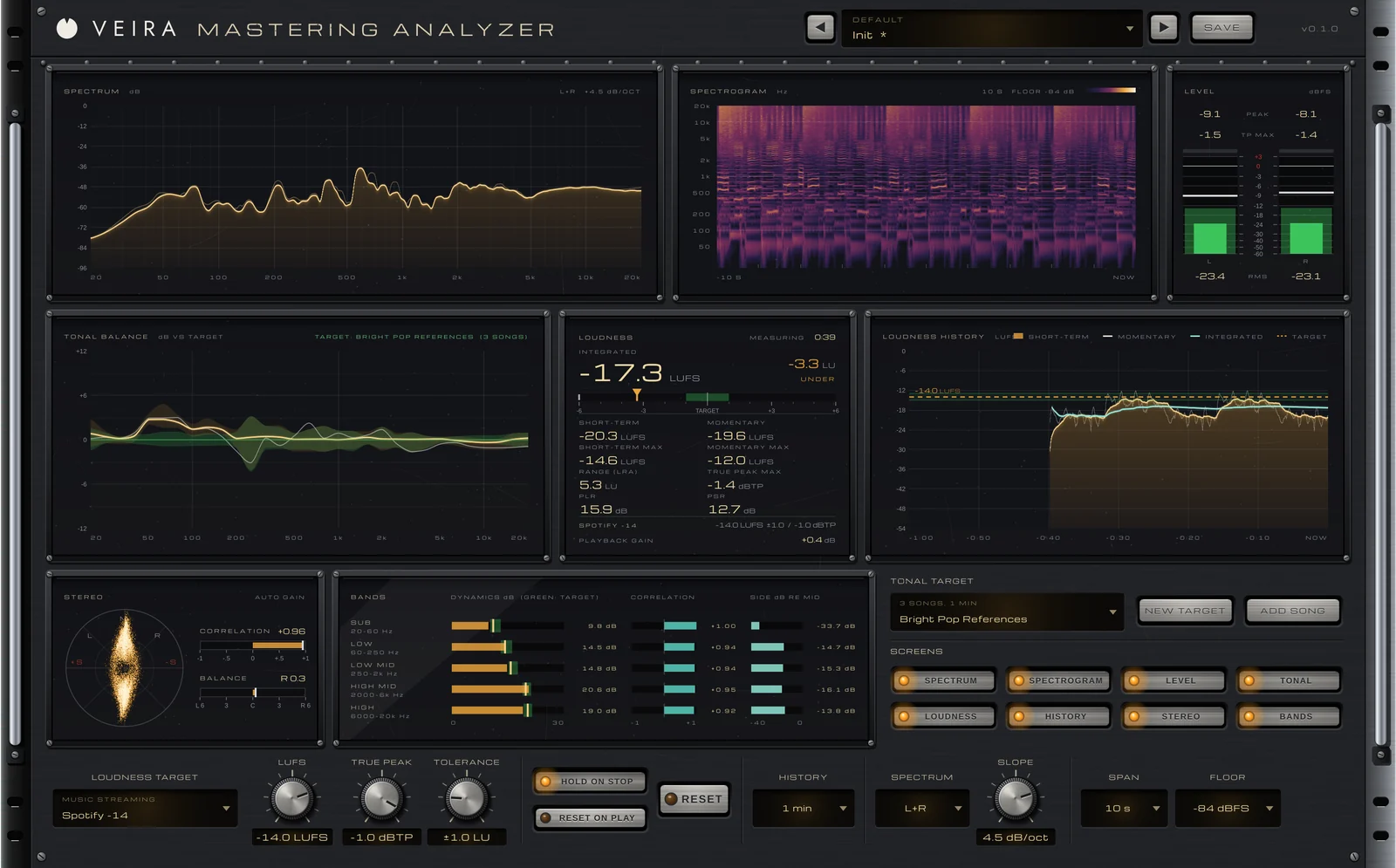
A master can sound great on your monitors and still have problems you won’t hear until it’s out: a streaming service turns it down further than you expected, the low end disappears on a phone, or the chorus is a wall of sound next to the songs it’s played with. A few minutes with the right meters before release catches most of this. Here’s what to look at, and what each reading tells you.
Loudness for where it’s going
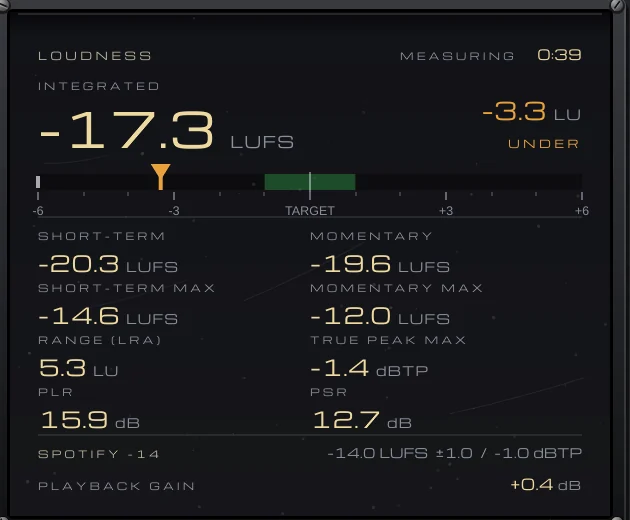
Most streaming services normalize playback, so a louder master is simply turned down. Integrated loudness, measured in LUFS over the whole song, is what they go by: −14 LUFS is a common streaming reference, and broadcast standards are often lower, such as −23 LUFS in much of Europe. You don’t have to hit a reference exactly, but knowing how much a master will be turned down tells you whether the extra limiting is buying anything. Check the true peak as well: a ceiling around −1 dBTP is common guidance, because encoding for streaming can push peaks above 0 dB.
Tonal balance against references
Ears adapt quickly, so judge the tone of a master against finished songs you trust in a similar style. Match their loudness first, or the louder one will always sound better. Then compare broadly: is your low end heavier, your top end brighter, your midrange more forward? Small differences are just the music; a large, consistent one is worth a look with the EQ.
Dynamics, stereo and mono
Loudness alone doesn’t tell you how squashed a master is. The peak-to-loudness ratio, or the crest factor of a single band, shows how much punch is left: a very low figure in the low end often means a kick and bass flattened by the limiter. For stereo, the correlation should stay positive most of the time. A low end that’s wide or out of phase can thin out or disappear in mono, which is how many phones and small speakers play it.
Check the whole song
A master is more than its loudest 30 seconds. Watch the short-term loudness through the song to see whether the chorus lifts or the whole track is flat as a ruler, and look at a spectrogram for a resonance that rings on or a hi-hat that’s too loud in only one section. Before you sign off, run through a short list:
- Integrated loudness and true peak against the destination.
- Tonal balance against references, at matched loudness.
- Dynamics overall and in the low end.
- Correlation, and how wide the low end is.
- The whole song, not just the loudest chorus.
Doing it with VEIRA Mastering Analyzer
VEIRA Mastering Analyzer is a meter built as a rack unit with eight live screens, and the sound passes untouched, bit for bit with no latency, so it sits last on the master after the limiter. Choose where the master is going from 19 streaming, broadcast, film, podcast and game standards, or set your own, and the LOUDNESS screen shows the integrated loudness with ON TARGET, OVER or UNDER, true peak, PLR and PSR, and the PLAYBACK GAIN a streaming service would apply.
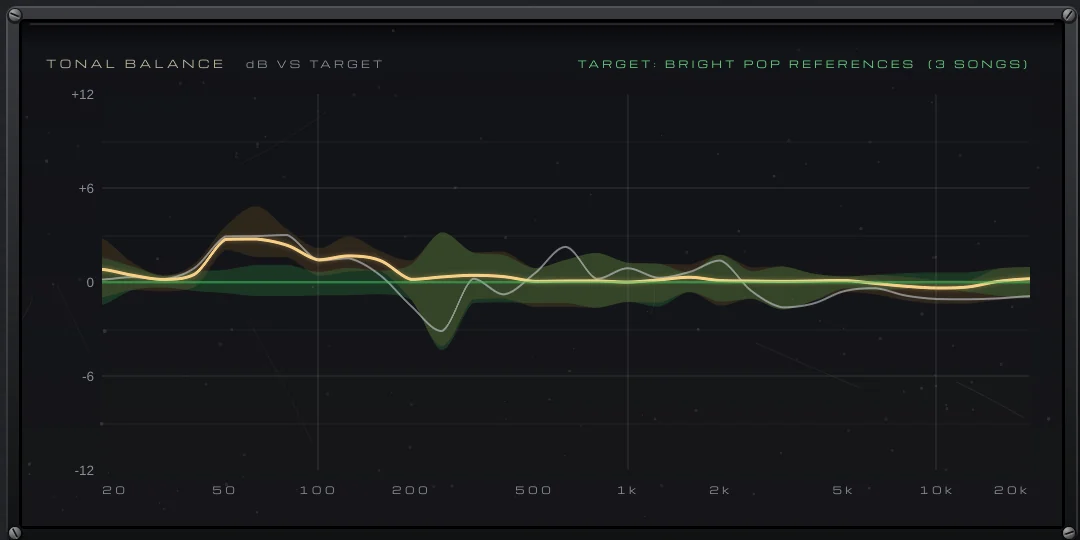
Play a song you love and press NEW TARGET, and it learns that song’s tonal balance across 31 third octaves, relative to its loudness, so a loud master and a quiet reference compare fairly; ADD SONG makes the target steadier. Your master is then drawn against the references’ range, so you know where to reach for the EQ and where the difference is just the music.
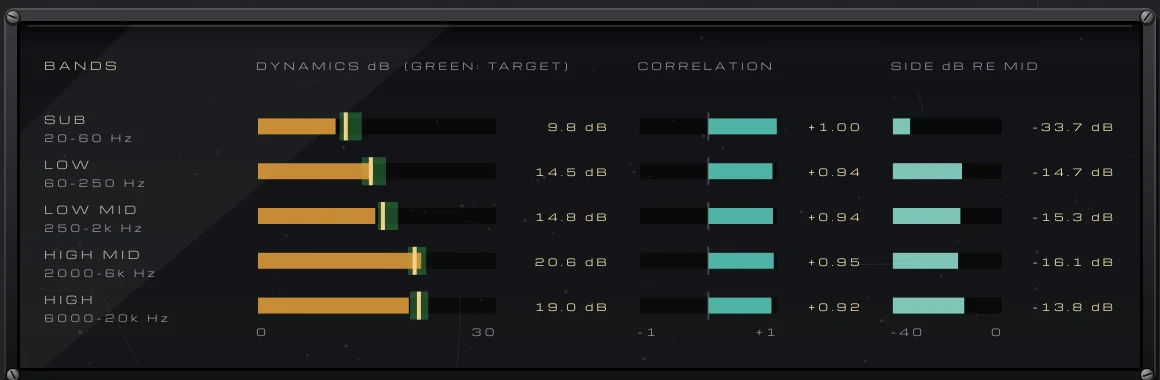
BANDS measures dynamics in five bands against your references’ range, along with each band’s correlation and width, so a squashed low end or a wide sub bass can’t hide behind a healthy overall reading. LOUDNESS HISTORY covers 30 seconds to 60 minutes, and the SPECTROGRAM shows the spectrum over time, newest at the right, so the whole song is there at a glance.